Power spectral density (PSD) calculator from CSV
The PSD (Welch) and Grms of any CSV column, in your browser. Nothing is uploaded.
Open a CSV to get its PSD
Drop it here or choose a file. The PSD settings open as soon as it is read.
The sample: 30 seconds of made-up random vibration in g, 1,000 readings a second.
Tip: drop several files to compare them.
Your file never leaves your device. It is read and charted by your browser. Nothing is uploaded.
Opens on the PSD (Welch) settings, with these defaults
Every one of them can be changed in the dialog before you open the plot:
- Channel
- The plotted channel; the sample rate from the time column (type it in when there is none).
- Welch
- Hann window; segments of 4,096 samples (fewer for a short file); 50 % overlap; each segment’s mean removed; the segments averaged.
- Result
- Density scaling, in unit²/Hz, one-sided from 0 Hz to half the sample rate; linear units (tick “Show in dB” for dB); the Grms over every frequency.
At a glance
- Method
- Welch’s method: the signal is cut into overlapping segments, each is windowed, its mean removed and its spectrum taken, and the spectra are averaged.
- Segment length
- 4,096 samples by default (a file with fewer rows starts at the largest power of two up to half of them). The frequency step is the sample rate divided by the segment length.
- Overlap
- 50 % by default, anything from 0 to 95 %.
- Window
- Hann by default; Hamming, Blackman, flat top and rectangular too.
- Scaling
- Density (per Hz, unit²/Hz), the default and the one a Grms needs, or spectrum (power per frequency step, unit²) for the size of tones.
- Units
- From the channel: a signal in g gives a PSD in g²/Hz and a Grms in g; in m/s², a PSD in (m/s²)²/Hz.
- Grms
- Over every frequency, or over a band you type in the dialog or on the plot.
- dB view
- “Show in dB”: 10·log10 of the PSD, reference 1 unit²/Hz.
- Peak table
- The highest peaks of the PSD, highest first: frequency, PSD and the Grms of each peak, marked on the plot. The top 5, 10 or 20, to copy or download as CSV.
- Accuracy
- Checked against SciPy by our own tests: 34 checks of the PSD, all passing.
- Processing
- Calculated in your browser. Your file is never uploaded.
- Price
- Free. No account or sign-up.
How to calculate a PSD from a CSV file
- Open your file. Choose a CSV, TSV, TXT, Excel, JSON, MATLAB, Parquet, HDF5 or LabVIEW TDMS file with a time column and one or more signal columns, or drop it on the tool at the top of this page. No file to hand? Click “Try a sample vibration signal”.
- Check the settings. The PSD settings open as soon as the file is read, on the plotted channel. The sample rate comes from the time column. Change the segment length, overlap, window or scaling if you need to, or type a Grms band.
- Open the plot and read the Grms. Click “Open plot”. The PSD appears as a plot of its own on logarithmic axes, with the Grms over every frequency and a table of its highest peaks; type a band into its From and To boxes for the Grms of that band. Download the PSD as a CSV or an image.
A worked example you can check
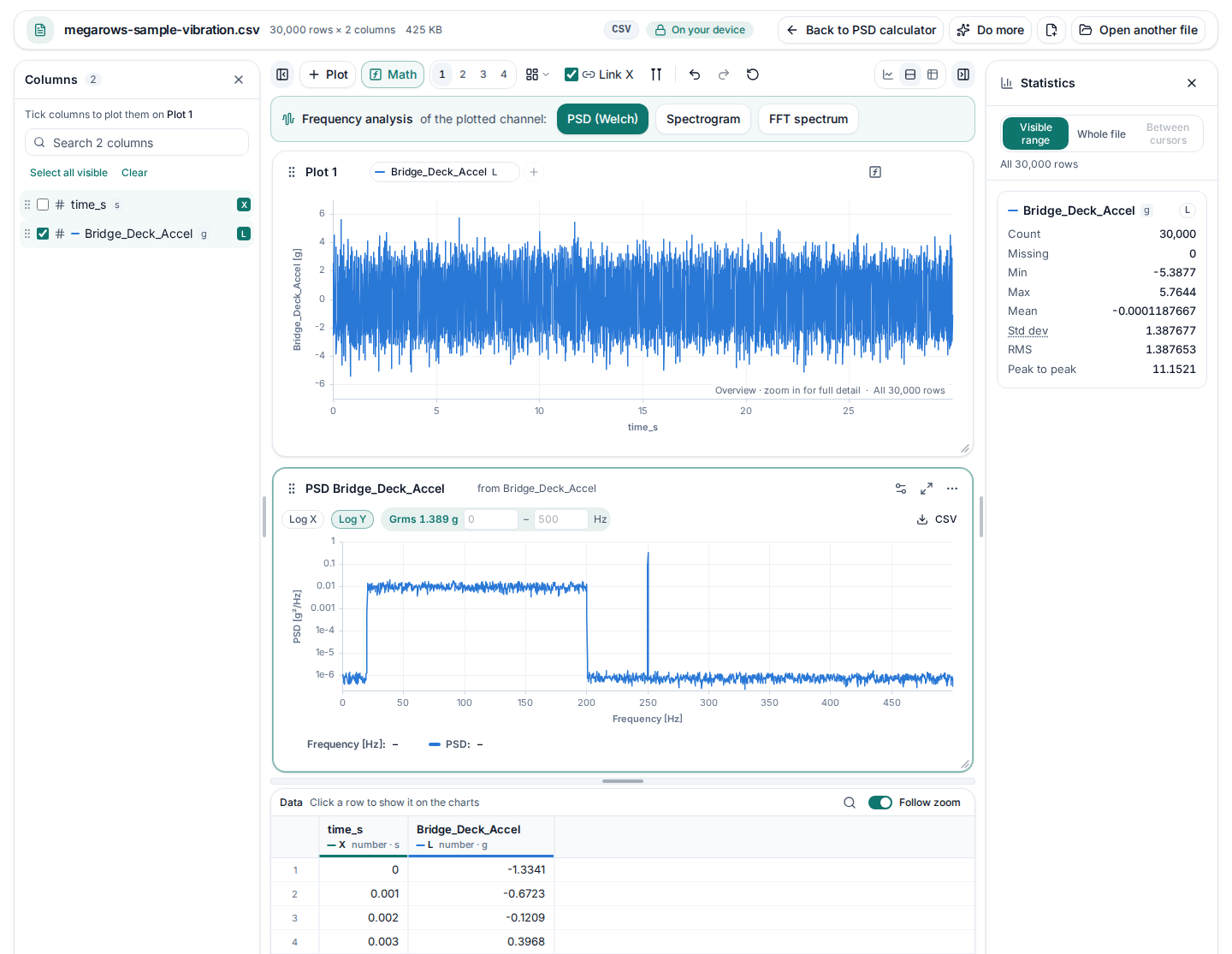
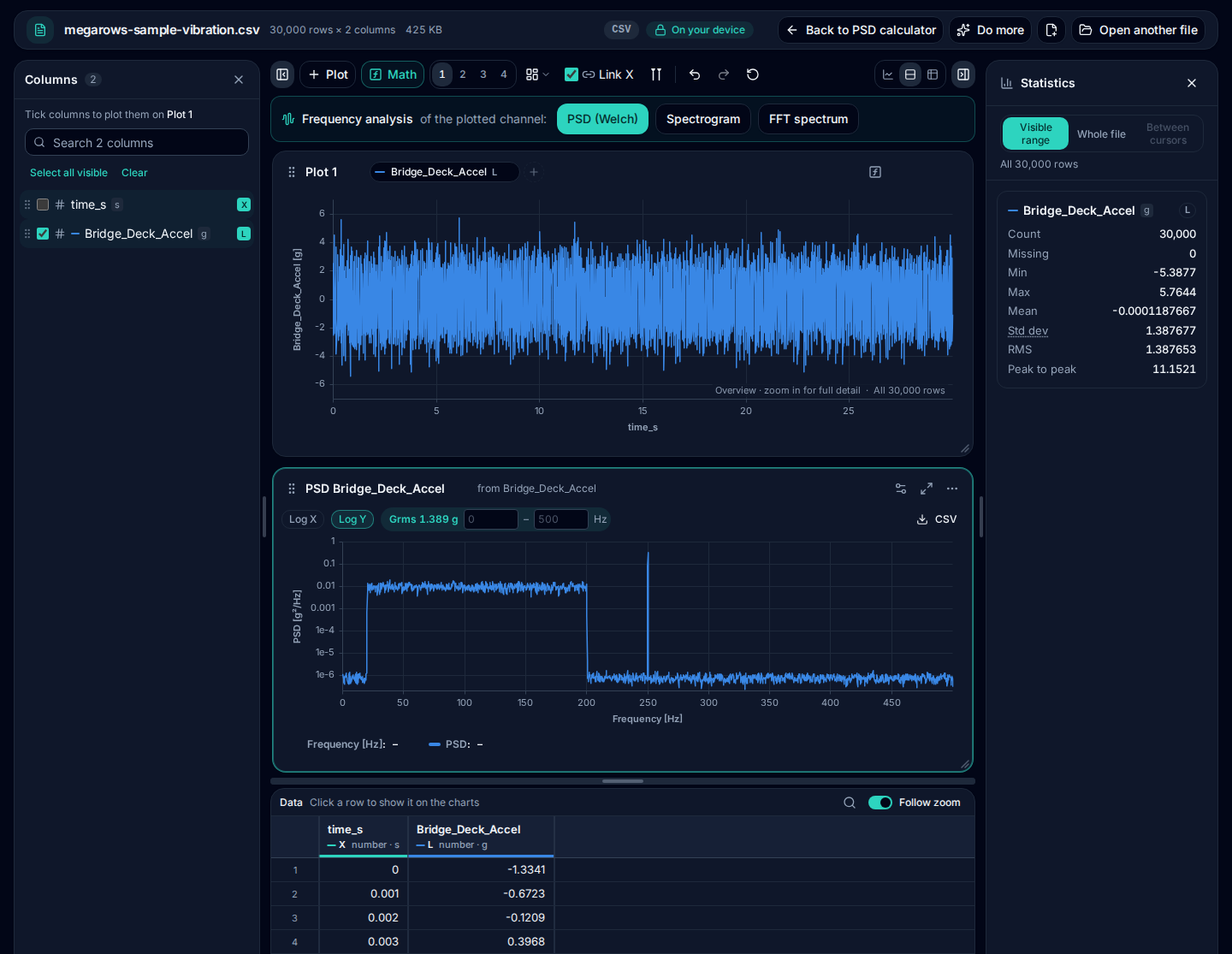
“Try a sample vibration signal” opens a made-up file of 30,000 readings taken 1,000 times a second (30 seconds). Its Bridge_Deck_Accel column, in g, holds random vibration with a flat PSD of 0.01 g²/Hz from 20 to 200 Hz, a 250 Hz tone of amplitude 0.5 g and a little background noise. Click Open plot without changing anything, and this is what you should get:
| Channel | Bridge_Deck_Accel [g], sample rate 1000 Hz from time_s |
|---|---|
| Window | Hann |
| Segment length | 4,096 samples |
| Overlap | 50 % (2,048 samples): 13 segments averaged |
| Scaling | Density (per Hz), one-sided, each segment’s mean removed |
| Frequency step | 1000 ÷ 4096 = 0.244 Hz |
| Grms, all frequencies | 1.389 g |
|---|---|
| Grms 20–200 Hz | 1.342 g (made as √(0.01 × 180) = 1.342 g) |
| PSD level 20–200 Hz | 0.0100 g²/Hz on average (made at 0.01) |
| Biggest peak | 250.00 Hz, PSD 0.342 g²/Hz (-4.67 dB) |
| Grms 245–255 Hz | 0.3537 g (the tone alone: 0.3536 g) |
The flat part of the plot sits at about 0.01 g²/Hz, the level the signal was made with, and its Grms is the square root of that level times the 180 Hz width of the band. The tone at 250 Hz is a sharp peak, the first row of the peak table next to the plot; a band around it gives the tone’s RMS, its amplitude divided by √2, and so does the table’s Grms of the peak (0.3537 g). To read the peak in dB, tick Show in dB in the dialog.
The same in Python
With the sample file downloaded, these lines give SciPy’s answer for the same settings (skiprows=[1] skips the units row):
import numpy as np, pandas as pd
from scipy import signal

x = pd.read_csv("megarows-sample-vibration.csv", skiprows=[1])["Bridge_Deck_Accel"].to_numpy()
f, p = signal.welch(x, fs=1000, window="hann", nperseg=4096, noverlap=2048)
band = (f >= 20) & (f <= 200)
print(f"Grms {np.sqrt(np.trapezoid(p, f)):.3f} g")
print(f"20-200 Hz: mean level {p[band].mean():.4f} g2/Hz")
k = np.argmax(p)
print(f"peak {f[k]:.2f} Hz  PSD {p[k]:.3f} g2/Hz")
They print:
Grms 1.389 g
20-200 Hz: mean level 0.0100 g2/Hz
peak 250.00 Hz  PSD 0.342 g2/Hz
We ran them on 8 October 2026 with NumPy 2.1.3, SciPy 1.14.1, pandas 2.2.3 and Python 3.12. A test runs the same calculation through MegaRows on every change to the site and checks that its numbers are the ones on this page, and that they match SciPy’s to about 12 significant digits. Download the sample file (CSV, 425 KB).
The settings, and what they change
Segment length and frequency step
The frequency step is the sample rate divided by the segment length: 1,000 ÷ 4,096 = 0.244 Hz for the sample. Longer segments give finer steps but fewer segments to average, so a noisier PSD; shorter segments give a smoother PSD with coarser steps. The result plot says how many segments were averaged.
Overlap
Each segment starts where the last one is half done (50 % overlap), so more segments fit in the signal and the windowed ends of one are the middle of the next. 0 % keeps segments apart; more than 75 % adds little.
Window
Every segment is tapered by a window before its spectrum is taken. Hann is the usual choice for random vibration. Flat top reads the size of a tone between two frequency steps most accurately; Blackman leaks least to nearby frequencies; rectangular (no taper) keeps the finest detail but leaks the most.
Density or spectrum scaling
Density divides by the frequency step, in unit²/Hz: the level of random vibration stays the same whatever the segment length, and the area under it is the mean square, so its square root is the Grms. Spectrum gives the power in each step, in unit²: a pure tone reads its RMS squared (0.125 g² for the sample’s 0.5 g tone), but random vibration reads lower as the steps get finer.
dB view
Show in dB plots 10·log10 of the PSD, with 1 unit²/Hz as 0 dB, so levels many decades apart fit on one linear axis.
Units: g²/Hz from g
The PSD takes its unit from the channel. Give each column its unit in a units row under the header, as the sample does ([s] and [g]), and the PSD comes out in g²/Hz and the Grms in g, the units of a random-vibration test profile. A signal in m/s² gives (m/s²)²/Hz, in Pa gives Pa²/Hz, and a signal without a unit gives a PSD per Hz.
- The highest frequency is half the sample rate: a file logged 1,000 times a second shows up to 500 Hz, so a profile up to 2,000 Hz needs at least 4,000 readings a second.
- From g to m/s²: multiply the signal by 9.80665 first (Math › Scale and offset); the PSD then grows by 9.80665².
Grms of the whole range and of a band
The Grms is the root of the area under the PSD: the overall level of a random vibration. The result plot shows it over every frequency, from 0 Hz to half the sample rate. Type a band into its From and To boxes, such as 20 to 200 Hz, and it shows the Grms of that band instead; the edges are read between frequency steps, so a band need not start on one. Set Grms band in the dialog to open the plot with the band already set.
The Grms of each peak
The peak table next to the plot lists the highest peaks of the PSD, highest first, with the Grms of each: the root of the area under the peak, from the dip on its left to the dip on its right. For a tone that is close to its RMS. A peak counts when it stands at least 3 dB above the dips either side; copy the table into a spreadsheet or download it as CSV.
Checked against SciPy
34 checks of the PSD, all passing. Our own tests run the PSD with every window, scaling and option through MegaRows and through SciPy on the same file, and compare every value: the largest difference was 2.4 × 10⁻¹⁵ of the size of the result. The worked example above is checked the same way on every change. See every check.
Private by design: nothing is uploaded
Vibration test data is often confidential. This tool reads your file and calculates the PSD in your browser, so the file and its name never leave your device. It works on files with millions of rows: the PSD uses every sample of the channel, and the practical limit is your device’s memory.
More for measured signals
- FFT from CSVThe amplitude spectrum or the PSD of a column (you choose which first), with a table of its peaks.
- Spectrogram from CSVHow the frequencies of a measured signal change over time, as a heat map.
- FRF and coherenceHow an output responds to an input: H1 and H2, phase and coherence.
- How we check our mathsEvery calculation checked against NumPy and SciPy by our own tests.
- CSV plotterPlot the signals themselves, zoom in and read the statistics.
Frequently asked questions
What does a PSD calculator do?
It works out the power spectral density of a signal: how its power is spread over frequency, per hertz. For vibration in g the result is in g²/Hz, the unit of random-vibration test profiles, and the square root of the area under it is the Grms, the overall level.
How do I calculate a PSD from a CSV file?
Open the CSV in the tool at the top of this page. The PSD settings open on the plotted channel with the sample rate from the time column; click “Open plot”. The defaults (Hann window, 4,096-sample segments, 50 % overlap, density scaling) suit most vibration data.
Which segment length should I use?
A longer segment gives a finer frequency step (the sample rate divided by the segment length) but fewer segments to average, so a noisier PSD. Start with the default and halve it if the PSD looks ragged; double it if two peaks merge. The dialog says how many segments were averaged.
What is the difference between density and spectrum scaling?
Density divides the power by the frequency step, so the level of random vibration does not depend on the segment length: use it for g²/Hz and for Grms. Spectrum gives the power in each frequency step, so a pure tone reads its own power (its RMS squared) whatever the segment length.
How do I get the Grms of a band?
Type the band, for example 20 to 2,000 Hz, into “Grms band” in the dialog before you open the plot, or into the From and To boxes on the PSD plot afterwards. The Grms is the square root of the area under the PSD between the two frequencies.
Does a log axis change the Grms?
No. The Grms is worked out from the PSD values themselves, the root of the area under the PSD, whatever axes the plot is drawn on: Log X and Log Y above the result plot change only the drawing. To plot a PSD saved by another program as frequency and value columns, see how to plot frequency data from a CSV on a log X axis.
Is this the Photoshop PSD format?
No. Here PSD means power spectral density, a way to look at measured signals such as vibration, pressure or sound. This page opens data files (CSV, Excel, JSON, MATLAB, Parquet, HDF5, LabVIEW TDMS), not Photoshop images.
Is my data uploaded?
No. The file is read and the PSD is calculated by your browser, on your own device. Neither the file nor its name is sent anywhere; you can check it in the Network tab of your browser’s developer tools.
Related tools and guides
- CSV plotterOpen a CSV, Excel, TXT, JSON, MATLAB, Parquet, HDF5 or LabVIEW TDMS file with millions of rows and plot it in several linked charts, with zoom and statistics. Works today.
- Large CSV viewerOpen a CSV with millions of rows in your browser: scroll every row, see each column’s type and statistics, chart any column. Works today.
- MATLAB .mat file viewerOpen v4 to v7.3 .mat files without MATLAB and plot any signal. Works today.
- Parquet viewerOpen large .parquet files, see the schema at once and plot millions of rows, without Python. Works today.
- TDMS viewerOpen .tdms files from LabVIEW, DIAdem and DAQmx loggers: every group, channel and property, each channel plotted against its time. Works today.
- HDF5 viewerOpen .h5, .hdf5 and NetCDF-4 .nc files: every group, dataset and attribute, each group’s datasets plotted against their time. Works today.
- MAT to CSVConvert the signals of a .mat file, v4 to v7.3, to a CSV for Excel or Python, without MATLAB. Works today.
- Parquet to CSVConvert a .parquet file to CSV in your browser, with the columns you pick. Works today.
- TDMS to CSVConvert the channels of a .tdms file to CSV, a group at a time, with its time column, without LabVIEW or Excel add-ins. Works today.
- HDF5 to CSVConvert the datasets of an .h5 or NetCDF-4 file to CSV, a table at a time, with its time column, without Python. Works today.
- Excel to CSVConvert any sheet of an .xlsx or .xlsm workbook to CSV, with the saved results of formulas, real dates and 15 significant digits. Works today.
- JSON to CSVConvert JSON and JSON Lines files to CSV: nested fields become columns named by their path, arrays stay as JSON text. Works today.
- CSV to MATConvert a CSV, Excel, JSON or Parquet file to a MATLAB .mat file: a field per column, with names and units, every row. Works today.
- Merge CSV filesAppend many CSV files into one, even with different columns or separators. Works today.
- Split CSV filesSplit a CSV too big for Excel into parts of 1,000,000 rows, parts of a size you choose, or one file per value of a column. Works today.
- CSV row counterCount the lines in a CSV, TSV or TXT file of any size. Works today.
- CSV statisticsCount, missing values, min, max, mean, standard deviation, RMS and peak to peak of each number column, for the whole file or the rows you zoom into. Works today.
- CSV histogramA histogram of any number column, with automatic bins or 10 to 200 of them, and each bin’s count as a table. Works today.
- CSV too large for Excel?Open every row of a CSV beyond Excel’s 1,048,576-row limit, or work around the limit in six other ways.
- FFT and PSD from a CSVTurn a signal column into an FFT spectrum or a PSD with Grms, with results checked against SciPy. Works today.
- Spectrogram from CSVSee how the frequencies of a measured signal change over time, as a heat map in dB, with the window and range you choose. Works today.
- FRF and coherencePick an input and an output column and get the frequency response (H1, H2, magnitude and phase) and their coherence. Works today.
- The MegaRows toolboxWhat works today and what is coming next, and why nothing is ever uploaded.
Coming soon to MegaRows: CSV to Excel and PDF reports · Compare CSV versions.
MegaRows processes files locally in your browser. Nothing is uploaded, not even the file name.