Online HDF5 viewer for .h5 and NetCDF-4 files
Open and plot .h5 and NetCDF-4 files in your browser. Nothing is uploaded.
Open an HDF5 or NetCDF-4 file to see and plot its datasets
Drop it here or choose a file. The datasets of each group open as a table, plotted against their time.
Made on your device, nothing downloaded: two days of made-up wind and temperature, 20 readings a second, 3,456,000 rows, with 1-minute and daily summaries.
Tip: drop several files to compare them.
Your file never leaves your device. It is read and charted by your browser. Nothing is uploaded.
Opens on the first group, plotted against its time
- Chart
- The first table’s first dataset against its time axis; tick more in the channel list.
- Tables
- One per group (its 1-D datasets of the same length), per 2-D dataset and per record array, in the menu of the file’s line.
- Variables
- Every group, dataset and attribute as a tree, with type and shape; a tick plots a dataset.
- Download
- “Download all columns (CSV)” under “Do more”: the table shown, with its time column.
At a glance
- Opens
- .h5, .hdf5 and .he5 files and NetCDF-4 .nc files, recognised by their content whatever the name: older and newer HDF5 layouts (superblocks 0, 2 and 3) and files that start after a user block.
- Groups and datasets
- The 1-D datasets of a group with the same length open as one table: numbers, then true or false, then text. Variables lists every group, dataset, link and attribute, with its type and its shape as h5py prints it.
- Time axis
- The dimension scale attached to the datasets (NetCDF’s coordinate variable), else a dataset named like a time that increases. CF units such as “hours since 2026-01-01 00:00:00” give dates and times in UTC.
- 2-D datasets and records
- A 2-D dataset becomes a table of columns along its time axis (else its longer side), named by a dimension scale of text or a columns attribute, up to 1,000 columns. Record arrays (compound datasets) open as tables too.
- Values
- Integers and floats, booleans and text. Units from the units attribute; packed values (scale_factor, add_offset) unpacked; _FillValue and missing_value shown as empty.
- Big files
- Up to 2 GB of numbers load for a file’s tables; a dataset past that is listed with why, and the rest of the file opens. Millions of samples zoom smoothly, every peak kept.
- Try it
- “Try a 3.5-million-row HDF5 file” makes two days of made-up wind and temperature readings, 20 a second, with 1-minute and daily summaries, as an HDF5 file on your device and opens it: nothing is downloaded or uploaded. Phones get six hours. “Sample HDF5 file”, under “Smaller samples”, is the month of weather the worked example uses.
- Export
- Any table as a CSV with its time column (“Download all columns (CSV)” under “Do more”); any chart as a PNG image.
- Not yet
- NetCDF 3 (classic) files (a plain message says so); datasets of three or more dimensions, and compression other than gzip and shuffle (LZF, SZIP, Blosc, …): those are listed with why, and the rest of the file opens.
- Processing
- Runs in your browser. Your file is never uploaded, and you need no Python, MATLAB or desktop viewer.
- Price
- Free. No account or sign-up.
How to open an HDF5 file online
- Open your .h5 or .nc file. Choose it, or drop it on the viewer at the top of this page. Its first group opens with its first dataset plotted against its time. No file to hand? Click “Try a 3.5-million-row HDF5 file”: two days of made-up readings, made on your device.
- See what’s inside. The menu in the file’s line lists its tables: one per group, per 2-D dataset and per record array. “Variables” shows every group, dataset, link and attribute, with its type, its shape and its first values.
- Plot, zoom and export. Tick datasets in the list or in Variables to plot them, zoom with the scroll wheel, a pinch or a drag, and read their statistics. “Download all columns (CSV)” under “Do more” saves the table shown, with its time column.
A worked example you can check
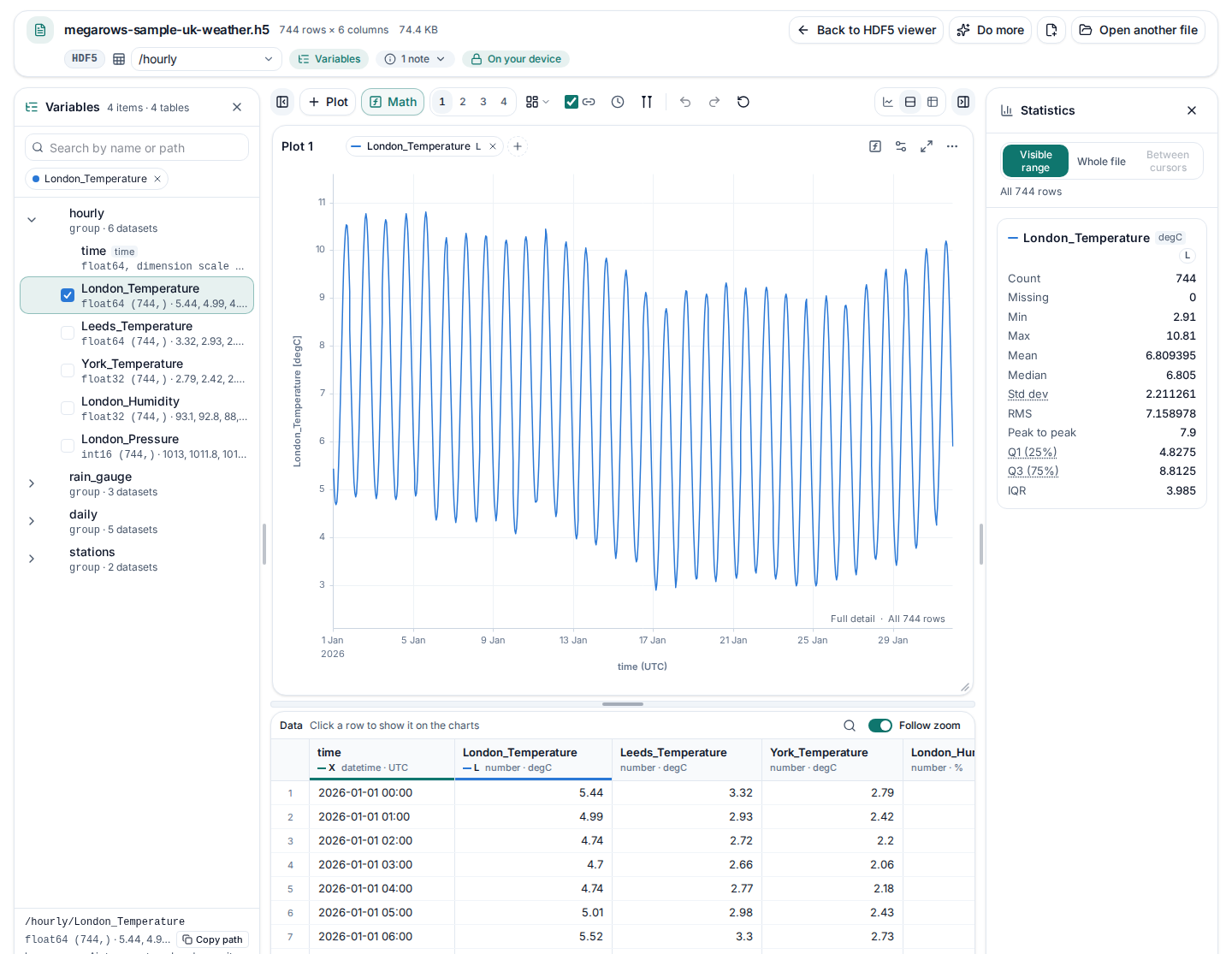
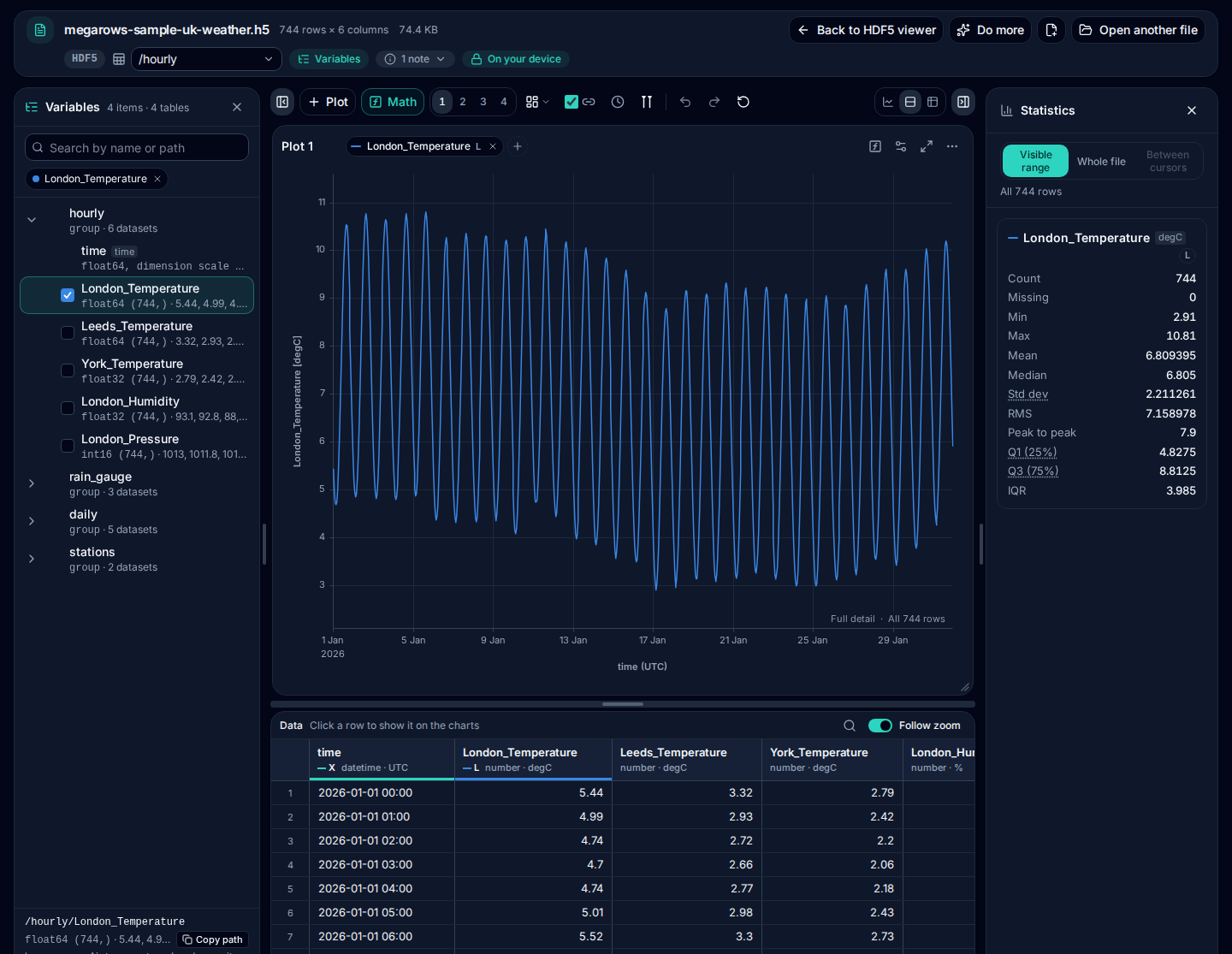
This example uses the smaller sample: “Sample HDF5 file”, under “Smaller samples”, opens a month of made-up UK weather, written with h5py: three groups at three rates, each with its own time, and a 2-D dataset (download the sample HDF5 file). It opens four tables:
- /hourly (744 rows, 5 columns): temperatures in London, Leeds and York, London’s humidity, and its pressure stored packed, every hour from 1 January 2026.
- /rain_gauge (4,464 rows, 2 columns): rain in London and Leeds every ten minutes, on a time of its own.
- /daily (31 rows, 4 columns): the day’s highest and lowest temperature, its rain and the weather in words.
- /stations/wind_speed (744 rows, 4 columns): one 2-D dataset of 744 hours × 4 stations: a column per station, named by its station dimension, against the hourly time.
It opens on /hourly, with London_Temperature plotted against the group’s time: a dimension scale whose units, “hours since 2026-01-01 00:00:00”, make it dates and times in UTC. In Variables, the dataset reads float64 (744,), with its first values 5.44, 4.99, 4.74, 4.7, … · degC, and its attributes long_name = Air temperature, London · units = degC.
London_Pressure is stored as packed integers, int16 (744,), with these attributes:
_FillValue = -32768 · add_offset = 1000 · long_name = Sea-level pressure, London · scale_factor = 0.1 · units = hPaThe viewer unpacks it (each value times scale_factor plus add_offset: 1013, 1011.8, 1012.6, 1012.3, … · hPa) and leaves empty the hours stored as the fill value (2 of them), so the line has a gap there instead of a drop to −32768.
The same file read with h5py, the Python library for HDF5 files, gives the same groups, values and times:
import h5py

with h5py.File("megarows-sample-uk-weather.h5", "r") as f:
    for name, group in f.items():
        print(name, list(group))
    t = f["hourly/London_Temperature"]
    print(t.dtype, t.shape, t.attrs["units"], t[:3])
    print(f["hourly/time"].attrs["units"], f["hourly/time"][:3])
    p = f["hourly/London_Pressure"]
    print(p[:3] * p.attrs["scale_factor"] + p.attrs["add_offset"])
    print(f["stations/wind_speed"].shape, f["stations/wind_speed"][0])
hourly ['time', 'London_Temperature', 'Leeds_Temperature', 'York_Temperature', 'London_Humidity', 'London_Pressure']
rain_gauge ['time', 'London_Rain', 'Leeds_Rain']
daily ['time', 'London_Max_Temperature', 'London_Min_Temperature', 'London_Rain_Total', 'London_Conditions']
stations ['station', 'wind_speed']
float64 (744,) degC [5.44 4.99 4.74]
hours since 2026-01-01 00:00:00 [0. 1. 2.]
[1013. 1011.8 1012.6]
(744, 4) [2.8 4.2 4.9 4.7]And “Download all columns (CSV)” under “Do more” starts the CSV of /hourly like this:
time,London_Temperature,Leeds_Temperature,York_Temperature,London_Humidity,London_Pressure
2026-01-01 00:00,5.44,3.32,2.79,93.1,1013
2026-01-01 01:00,4.99,2.93,2.42,92.8,1011.8
2026-01-01 02:00,4.74,2.72,2.2,88,1012.6
Run on 2026-10-09 with h5py 3.16.0, HDF5 2.0.0, NumPy 2.5.3, Python 3.12.15. A test opens the sample on every change to the site and checks that the viewer shows these tables, times and values, and writes this CSV. Download the sample (.h5, 74 KB) to open it elsewhere too.
Groups, datasets and their time
An HDF5 file holds groups of datasets, each with attributes. The viewer turns each group into a table: its 1-D datasets of the same length become columns, numbers first, then true or false, then text, so the readings of one logger or one model output plot on one time axis. Datasets of another length in the same group get a table of their own, and datasets you tick in Variables from different tables open together, each on its own x axis.
The x axis is the dimension scale attached to the datasets, else a dataset of the group named like a time whose values increase. CF time units (“seconds since …”, “hours since …”, “days since …”) give dates and times in UTC. Units come from each dataset’s units attribute; packed values (scale_factor, add_offset) are unpacked, and _FillValue and missing_value are shown as empty, as the CF conventions ask.
A 2-D dataset becomes a table of its own: its samples run along the dimension with a time axis (else the longer one), and each step of the other dimension is a column, named by a dimension scale of text (as the sample’s station dimension names London, Manchester, Leeds and Glasgow) or by a columns attribute. A record array (a compound dataset) becomes a table of its members, a time member as its x axis.
NetCDF-4 files
A NetCDF-4 .nc file is an HDF5 file underneath, so it opens the same way: its variables of each dimension make a table, the coordinate variable of that dimension is the time axis, its CF times are dates and times, and a 2-D variable over a station dimension gets the station names as its column names. NetCDF dimensions without values of their own are listed in Variables. NetCDF 3 (classic) files are a different format and get a plain message.
Big files
HDF5 files are often large. The viewer reads the file on your device and loads the datasets its tables use, up to 2 GB of numbers; a dataset that would go past that is listed in Variables with why, and the rest of the file opens. Zooming reloads the full detail of the range in view, so a one-sample spike in millions stays visible.
To see it with a big file, “Try a 3.5-million-row HDF5 file” makes two days of made-up sonic anemometer readings on your device (the wind in three directions and the temperature, 20 a second) and writes them as an HDF5 file: /sonic with 3,456,000 rows against a CF time, /minute with each minute’s mean, lowest and highest value, and /daily, a summary of each day. Then it opens like any other file: nothing is downloaded or uploaded. Zoom into any ten seconds of /sonic and every reading is there. Phones get six hours, 432,000 rows, without /daily.
What isn’t supported yet
- NetCDF 3 (classic) files. They are not HDF5 files underneath, so they get a plain message instead. Save the file as NetCDF-4 (the netCDF tools’ nccopy can convert it) or as CSV, and open that.
- Datasets of three or more dimensions. A map over time or a stack of images is listed in Variables with its shape, greyed out with why, and not plotted yet. The 1-D and 2-D datasets of the file open as usual.
- Some compression filters. gzip (deflate) and shuffle are read. A dataset compressed with LZF, SZIP, Blosc, Zstandard or another filter is listed with the filter’s name and not read; save it with gzip, or none, to open it.
- Single values, references and other types. Single values, empty datasets, references and opaque data are listed in Variables, with their attributes, but have nothing to plot.
- Other calendars. CF times on the standard calendar become dates and times. Times on another calendar, such as noleap or 360_day, stay numbers, with their units.
- Editing and saving. The viewer reads HDF5 files; it never changes them. To keep a table, download it as a CSV.
HDF5 to CSV
Need the data in Excel, Python or R? Open the file, pick a table in the menu of the file’s line, and use “Download all columns (CSV)” under “Do more”: every column and row of that table, its time column first, numbers to 15 significant digits. Each table downloads on its own. The HDF5 to CSV converter does the same in one click: it opens the file on its table, with “Download as CSV” over it.
Private by design: nothing is uploaded
Measurement and simulation files often hold data that must not leave the lab. MegaRows uploads nothing: the viewer runs entirely in your browser, and the file and its name are never sent anywhere. Read the privacy statement for details.
Other ways to open an HDF5 file
Other tools, in the words of their own pages:
- myHDF5 (at myhdf5.hdfgroup.org, based on H5Web): “Online service to explore and visualize HDF5 files stored locally or hosted on Zenodo, GitHub, and other platforms.” Its page.
- HDFView (the HDF Group’s desktop tool): “HDFView is a visual tool written in Java for browsing and editing HDF (HDF5 and HDF4) files.” Its page.
- Panoply (NASA GISS, for the desktop): “Panoply plots geo-referenced and other arrays from netCDF, HDF, GRIB, and other datasets.” Its page.
- In code: h5py in Python, as in the example above, and MATLAB’s h5read and ncread.
Quoted from the pages linked, read on 9 Oct 2026.
The viewer on this page is made for time series: it opens the datasets of a group as one table against their time, so you can plot several in linked plots, measure them with cursors, read their statistics, run an FFT and download them as a CSV. It also opens MATLAB files, on the MAT file viewer (v7.3 files are HDF5 too), NI TDMS files, on the TDMS viewer, and CSV files far too big for Excel, on the large CSV viewer.
Next steps with your data
- HDF5 to CSVAny table of an .h5 or NetCDF-4 file as a CSV, with its time column.
- MAT file viewerMATLAB .mat files, v7.3 (HDF5) too, opened and plotted the same way.
- TDMS viewerNI TDMS files from LabVIEW and DAQmx loggers, each channel against its time.
- Large CSV viewerScroll, sort and filter a CSV, millions of rows too.
- CSV to MATA CSV you exported as a MATLAB .mat file, a field per column.
- CSV plotterHDF5 datasets next to CSV, Excel and MATLAB files.
Frequently asked questions
How do I open an HDF5 file online?
Open it in the viewer at the top of this page. Your browser reads the .h5 file on your own device: its groups, datasets and attributes appear, and the first group’s first dataset is plotted against its time. You need no Python, MATLAB or desktop viewer, and nothing is installed.
Is my HDF5 file uploaded?
No. The file is read by your browser on your own device, and neither the file nor its name is sent anywhere, so there is no upload and no upload size limit. You can check it in the Network tab of your browser’s developer tools.
Which HDF5 and NetCDF files can I open?
HDF5 files (.h5, .hdf5, .he5) and NetCDF-4 files (.nc): numbers, booleans and text in groups, 2-D datasets and record arrays, with dimension scales, CF times, units, packed values and fill values. gzip and shuffle compression are read. NetCDF 3 (classic) files, datasets of three or more dimensions and other compression filters are not yet: the viewer says so and opens the rest of the file.
What is the difference between NetCDF-4 and NetCDF 3?
A NetCDF-4 file is an HDF5 file underneath, written with the netCDF conventions: dimensions, coordinate variables and attributes such as units. This viewer opens it with its coordinate variable as the time axis and its CF times as dates. NetCDF 3, the classic format (also its 64-bit variants), is a different, simpler format that isn’t read yet: the viewer says so. The netCDF tools’ nccopy converts a NetCDF 3 file to NetCDF-4.
Can I open a MATLAB v7.3 .mat file here?
Yes. A .mat file saved with -v7.3 is an HDF5 file, and the viewer recognises it as a MATLAB file: it opens with MATLAB’s variables, structs, tables and timeseries rather than the HDF5 groups underneath. The MAT file viewer explains what it reads, from v4 to v7.3.
How large an HDF5 file can I open?
The file is read on your device, so no upload limit applies. Up to 2 GB of numbers are loaded for its tables; a dataset that would go past that is listed in Variables with why, and the rest of the file opens. The practical limit is your device’s memory.
Where does the time axis come from?
From the dimension scale attached to the datasets (in a NetCDF-4 file, the coordinate variable of their dimension), else from a dataset of the group named like a time (time, t, timestamp) whose values increase. CF units such as “hours since 2026-01-01 00:00:00” give dates and times in UTC. Without any of these, the x axis is the row number.
Can I convert an HDF5 file to CSV?
Yes. The HDF5 to CSV converter opens the file on its table and downloads the table shown in one click, its time column first, numbers to 15 significant digits; here, “Download all columns (CSV)” under “Do more” does the same. Pick another table in the menu of the file’s line and download it too. Excel, Python and R open the CSV directly.
Related tools and guides
- CSV plotterOpen a CSV, Excel, TXT, JSON, MATLAB, Parquet, HDF5 or LabVIEW TDMS file with millions of rows and plot it in several linked charts, with zoom and statistics. Works today.
- Large CSV viewerOpen a CSV with millions of rows in your browser: scroll every row, see each column’s type and statistics, chart any column. Works today.
- MATLAB .mat file viewerOpen v4 to v7.3 .mat files without MATLAB and plot any signal. Works today.
- Parquet viewerOpen large .parquet files, see the schema at once and plot millions of rows, without Python. Works today.
- TDMS viewerOpen .tdms files from LabVIEW, DIAdem and DAQmx loggers: every group, channel and property, each channel plotted against its time. Works today.
- MAT to CSVConvert the signals of a .mat file, v4 to v7.3, to a CSV for Excel or Python, without MATLAB. Works today.
- Parquet to CSVConvert a .parquet file to CSV in your browser, with the columns you pick. Works today.
- TDMS to CSVConvert the channels of a .tdms file to CSV, a group at a time, with its time column, without LabVIEW or Excel add-ins. Works today.
- HDF5 to CSVConvert the datasets of an .h5 or NetCDF-4 file to CSV, a table at a time, with its time column, without Python. Works today.
- Excel to CSVConvert any sheet of an .xlsx or .xlsm workbook to CSV, with the saved results of formulas, real dates and 15 significant digits. Works today.
- JSON to CSVConvert JSON and JSON Lines files to CSV: nested fields become columns named by their path, arrays stay as JSON text. Works today.
- CSV to MATConvert a CSV, Excel, JSON or Parquet file to a MATLAB .mat file: a field per column, with names and units, every row. Works today.
- Merge CSV filesAppend many CSV files into one, even with different columns or separators. Works today.
- Split CSV filesSplit a CSV too big for Excel into parts of 1,000,000 rows, parts of a size you choose, or one file per value of a column. Works today.
- CSV row counterCount the lines in a CSV, TSV or TXT file of any size. Works today.
- CSV statisticsCount, missing values, min, max, mean, standard deviation, RMS and peak to peak of each number column, for the whole file or the rows you zoom into. Works today.
- CSV histogramA histogram of any number column, with automatic bins or 10 to 200 of them, and each bin’s count as a table. Works today.
- CSV too large for Excel?Open every row of a CSV beyond Excel’s 1,048,576-row limit, or work around the limit in six other ways.
- FFT and PSD from a CSVTurn a signal column into an FFT spectrum or a PSD with Grms, with results checked against SciPy. Works today.
- PSD calculatorTurn a vibration column into a power spectral density (Welch) in g²/Hz, with the Grms of any band and a dB view. Works today.
- Spectrogram from CSVSee how the frequencies of a measured signal change over time, as a heat map in dB, with the window and range you choose. Works today.
- FRF and coherencePick an input and an output column and get the frequency response (H1, H2, magnitude and phase) and their coherence. Works today.
- The MegaRows toolboxWhat works today and what is coming next, and why nothing is ever uploaded.
Coming soon to MegaRows: CSV to Excel and PDF reports · Compare CSV versions.
MegaRows processes files locally in your browser. Nothing is uploaded, not even the file name.