Convert Parquet to CSV Online
Turn a .parquet file into a CSV in your browser: see the schema, pick the columns, download every row. Free, and nothing is uploaded.
Convert a Parquet file to CSV
Drop a .parquet file here or choose one. Every row, the columns you pick, straight to a CSV file.
Your file never leaves your device. It is read and converted by your browser. Nothing is uploaded.
At a glance
- What you get
- A CSV file with a header row, comma separated, UTF-8: every row of the file and the columns you tick.
- Values
- Numbers with 15 significant digits, as Excel writes them (every digit on request), dates and times as 2026-01-05 08:00:00, missing values as empty cells.
- Before you convert
- The schema with each column’s type and statistics, so you can leave out what you do not need.
- Size
- Millions of rows; the practical limit is your device’s memory.
- Processing
- Runs in your browser. The file is never uploaded, and you need no Python or command line.
- Price
- Free. No account or sign-up.
How to convert Parquet to CSV
- Open your .parquet file. Drop it onto the converter at the top of this page, or click “Choose a Parquet file”. The schema, row count and column statistics appear at once.
- Pick the columns. Every column that can be shown is ticked. Untick the ones you do not need; columns that hold lists or maps are listed but cannot be converted yet.
- Download the CSV. Click “Download CSV”. Every row is written to a CSV file with a header row, and your browser saves it like any download. “Plot this file” opens the same file in the plotter.
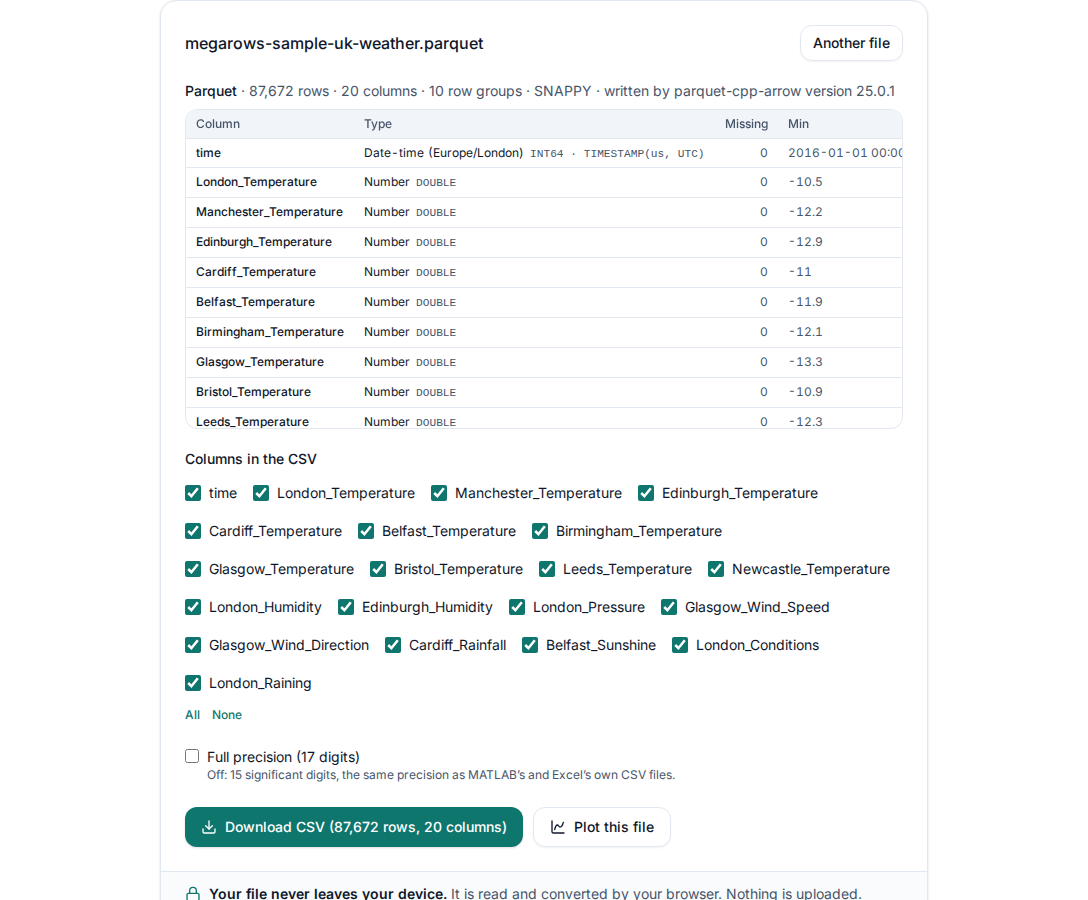
No Parquet file to hand? Try a sample Parquet file in the converter, or download the sample Parquet file to open it in other tools too.
What you get
- Every row of the file, in the order of the file, with a header row of column names.
- Numbers to 15 significant digits, as Excel writes them, or every digit with “Full precision (17 digits)”; never rounded for display, and a 32-bit float in its own shortest form.
- Dates and times such as 2026-01-05 08:00:00, and times of day such as 06:30:00. A timestamp with its own time zone (Europe/London, say) is written on that zone’s clock with its offset, such as 2026-03-29 02:00:00+01:00; one stored in UTC without a zone is written in UTC.
- Missing values as empty cells, booleans as true and false.
- Structs as one column per field, named like station.name. Lists and maps are left out, and the converter says so.
Look before you convert
The schema appears as soon as you choose the file: every column with its type, missing values and smallest and largest value. To look at the data itself, “Plot this file” opens it in the plotter on this page, with a chart and a table of every row; the Parquet viewer does the same from the start.
Private by design: nothing is uploaded
Online converters that upload your file put a copy of your data on someone else’s server. This one runs entirely in your browser: the file and its name are never sent anywhere. Read the privacy statement for details.
The same in Python
If you have Python with pandas and pyarrow installed, pd.read_parquet("file.parquet").to_csv("file.csv", index=False) does the conversion in one line. The converter here needs no installation, shows the schema first and lets you pick the columns.
Frequently asked questions
How do I convert a Parquet file to CSV without Python?
Open the file in the converter at the top of this page, tick the columns you want and click “Download CSV”. Your browser does the conversion on your own device: no Python, pandas or command line, and nothing to install.
Is my Parquet file uploaded?
No. The file is read and converted by your browser on your own device; neither the file nor its name is sent anywhere. That makes it safe for confidential data.
What does the CSV look like?
One header row with the column names, then one line per row, comma separated and UTF-8. Numbers have 15 significant digits, as Excel writes them (tick “Full precision (17 digits)” for every digit; a 32-bit float in its own shortest form), dates and times read like 2026-01-05 08:00:00 (a timestamp with its own time zone on that zone’s clock with the offset, such as 2026-03-29 02:00:00+01:00; one stored in UTC without a zone in UTC), booleans are true or false, and missing values are empty cells. Fields of a struct become columns named like station.name.
How big a Parquet file can I convert?
Files with millions of rows convert in your browser; the practical limit is your device’s memory, since the CSV is usually several times larger than the Parquet file. Leaving out columns you do not need makes it smaller and faster.
Which Parquet files work?
Files written by pandas, pyarrow and other Parquet writers, with Snappy, Gzip, Zstandard, Brotli or LZ4 compression or none. Columns of lists, maps or raw bytes cannot be converted yet; the converter lists them.
Can I open the CSV in Excel?
Yes. Excel opens it directly; files over 1,048,576 rows are cut off at that row by Excel, so convert fewer rows or open the file in the plotter here instead, which has no fixed row limit.
Related tools and guides
- CSV plotterOpen a CSV, Excel, TXT, JSON, MATLAB, Parquet, HDF5 or LabVIEW TDMS file with millions of rows and plot it in several linked charts, with zoom and statistics. Works today.
- Large CSV viewerOpen a CSV with millions of rows in your browser: scroll every row, see each column’s type and statistics, chart any column. Works today.
- MATLAB .mat file viewerOpen v4 to v7.3 .mat files without MATLAB and plot any signal. Works today.
- Parquet viewerOpen large .parquet files, see the schema at once and plot millions of rows, without Python. Works today.
- TDMS viewerOpen .tdms files from LabVIEW, DIAdem and DAQmx loggers: every group, channel and property, each channel plotted against its time. Works today.
- HDF5 viewerOpen .h5, .hdf5 and NetCDF-4 .nc files: every group, dataset and attribute, each group’s datasets plotted against their time. Works today.
- MAT to CSVConvert the signals of a .mat file, v4 to v7.3, to a CSV for Excel or Python, without MATLAB. Works today.
- TDMS to CSVConvert the channels of a .tdms file to CSV, a group at a time, with its time column, without LabVIEW or Excel add-ins. Works today.
- HDF5 to CSVConvert the datasets of an .h5 or NetCDF-4 file to CSV, a table at a time, with its time column, without Python. Works today.
- Excel to CSVConvert any sheet of an .xlsx or .xlsm workbook to CSV, with the saved results of formulas, real dates and 15 significant digits. Works today.
- JSON to CSVConvert JSON and JSON Lines files to CSV: nested fields become columns named by their path, arrays stay as JSON text. Works today.
- CSV to MATConvert a CSV, Excel, JSON or Parquet file to a MATLAB .mat file: a field per column, with names and units, every row. Works today.
- Merge CSV filesAppend many CSV files into one, even with different columns or separators. Works today.
- Split CSV filesSplit a CSV too big for Excel into parts of 1,000,000 rows, parts of a size you choose, or one file per value of a column. Works today.
- CSV row counterCount the lines in a CSV, TSV or TXT file of any size. Works today.
- CSV statisticsCount, missing values, min, max, mean, standard deviation, RMS and peak to peak of each number column, for the whole file or the rows you zoom into. Works today.
- CSV histogramA histogram of any number column, with automatic bins or 10 to 200 of them, and each bin’s count as a table. Works today.
- CSV too large for Excel?Open every row of a CSV beyond Excel’s 1,048,576-row limit, or work around the limit in six other ways.
- FFT and PSD from a CSVTurn a signal column into an FFT spectrum or a PSD with Grms, with results checked against SciPy. Works today.
- PSD calculatorTurn a vibration column into a power spectral density (Welch) in g²/Hz, with the Grms of any band and a dB view. Works today.
- Spectrogram from CSVSee how the frequencies of a measured signal change over time, as a heat map in dB, with the window and range you choose. Works today.
- FRF and coherencePick an input and an output column and get the frequency response (H1, H2, magnitude and phase) and their coherence. Works today.
- The MegaRows toolboxWhat works today and what is coming next, and why nothing is ever uploaded.
Coming soon to MegaRows: CSV to Excel and PDF reports · Compare CSV versions.
MegaRows processes files locally in your browser. Nothing is uploaded, not even the file name.