Free MAT File Viewer: Read and Plot .mat Files Online, Without MATLAB
Open MAT v4, v6, v7 and v7.3 files in your browser. Free, and nothing is uploaded.
Open a MATLAB .mat file
Drop it here or choose a file to plot its signals. Files of several GB are fine.
No .mat file to hand? Try a sample Simulink log.
Tip: drop several files to compare them.
Your file never leaves your device. It is read and charted by your browser. Nothing is uploaded.
How to open a .mat file online
- Open this page, the MegaRows MAT file viewer, in any browser: no MATLAB needed.
- Drop your .mat file on the viewer above, or click “Choose a file”.
- Tick the signals you want to plot in the Channels list or in Variables.
It reads MATLAB v4 to v7.3 files, nothing is uploaded, and you need no MATLAB account.
At a glance
- MAT-file versions
- MATLAB v4, v6, v7 and v7.3 (save -v4, -v6, -v7 or -v7.3), including Simulink- and dSPACE-style logs and files written by Python (scipy.io.savemat or hdf5storage).
- Finds your signals
- Simulink simulation output saved as it is, Simulation Data Inspector exports, logs in Simulink’s To Workspace formats, including the Timeseries format and structs of timeseries, MATLAB tables and timetables (with their dates, durations, text and categories), dSPACE-style files with X and Y channels, structs of signals, numbers inside cell arrays, matrices with channel names and plain vectors with a time vector.
- See what’s inside
- Every variable, struct field, cell and Simulink log with its MATLAB class, its size and its value. Tick any signal to plot it, from any table. A settings or parameter file with nothing to plot opens there too.
- Big files
- Files of several GB. Four channels of 10 million samples each (a 330 MB v7.3 file) open in under 3 seconds.
- Charts
- Zoomable line, step and scatter charts and histograms with a left and a right y axis, up to 8 signals, box plots, PNG export. Averages per time window, time spent in each speed or rpm band, and values per gear.
- Statistics
- Count, missing values, min, max, mean, median, quartiles and standard deviation for every signal.
- MATLAB needed?
- No. No MATLAB licence, no toolbox, no install.
- Processing
- Runs in your browser. Your .mat file is never uploaded.
- Price
- Free. No account or sign-up.
How to open a .mat file without MATLAB
Four steps, from the file to the numbers you need: open it, see what’s inside, plot it, export it.
- Open your .mat file. Drop the .mat file onto the viewer at the top of this page, or click “Choose a file”. Every MAT-file version from v4 to v7.3 works, and there is nothing to install.
- See the variables. Click “Variables” on the file’s line: every variable, struct field, cell and Simulink log is listed with its MATLAB class, its size and its first values. Search them by name or path.
- Plot any signal. The first signal is plotted against time at once. Tick more in Variables or in the channel list, even signals from different tables logged at different rates: each keeps its own time. Zoom with the scroll wheel, a pinch or a drag, and read the statistics in the side panel.
- Export what you need. Download the signals as a CSV file for Excel or Python, or the chart as an image. Going the other way, a CSV file converts to a .mat file.
Open any .mat file: MATLAB v4 to v7.3
The viewer recognises the version from the file itself, so you never have to say how a file was saved.
| Version | Saved with | Notes |
|---|---|---|
| MATLAB v4 | save -v4, MATLAB 4, scipy.io.savemat with format="4" | Numeric and text matrices. |
| MATLAB v6 | save -v6, scipy.io.savemat | Uncompressed. Numbers, text, logicals, structs, cell arrays and sparse matrices. |
| MATLAB v7 | save (MATLAB’s default), save -v7, scipy.io.savemat with do_compression=True | Compressed. Everything v6 holds. |
| MATLAB v7.3 | save -v7.3 (needed for variables over 2 GB), hdf5storage | The format for very large data. Files of several GB open. |
MATLAB data files only. Other programs use the .mat extension too, such as Microsoft Access for its table shortcuts, and some image tools. Those files hold no MATLAB data: this viewer is for the .mat files that MATLAB, Simulink and Python (SciPy, hdf5storage) write.
See what’s inside: variables, structs, cells and Simulink logs
Click Variables on the file’s line to see the file the way MATLAB’s workspace does: every variable, struct field, struct array element, cell, table variable and Simulink Dataset element, nested as in the file, with its class (double, struct, timetable, Simulink.SimulationOutput, …), its size as MATLAB writes it, such as [601 1], and its first values. Search by name or path, and tick any signal to plot it.
Anything the viewer can’t read yet stays in the list, greyed out, with what to do instead. With the keyboard, the arrow keys move through the list, Enter opens a struct and Space ticks a signal. On a phone the list takes the whole screen.
A file with nothing to plot, such as a settings or parameter file, opens straight in Variables. Pick any field to see its value: text up to 2,000 characters, numbers with every digit, arrays of up to 100 values as MATLAB writes them. Copy path gives where it is as MATLAB writes it, such as station.sensors(2).model, and Copy value the value itself.
Simulink-style drive log
Two tables of a made-up one-minute drive at 200 Hz and 1 Hz: speed, engine speed, accelerations, gear and temperatures.
Open the drive logNested struct and Simulink log
A Simulink simulation of made-up UK weather, saved in MATLAB as it is: a SimulationOutput with a logged Dataset at three rates, a bus and To Workspace variables. It opens with its variables in view.
Explore its variablesBoth examples are made-up data, read on your device like your own files. The weather simulation is also a sample MAT file to download.
Plot any signal, even ones logged at different rates
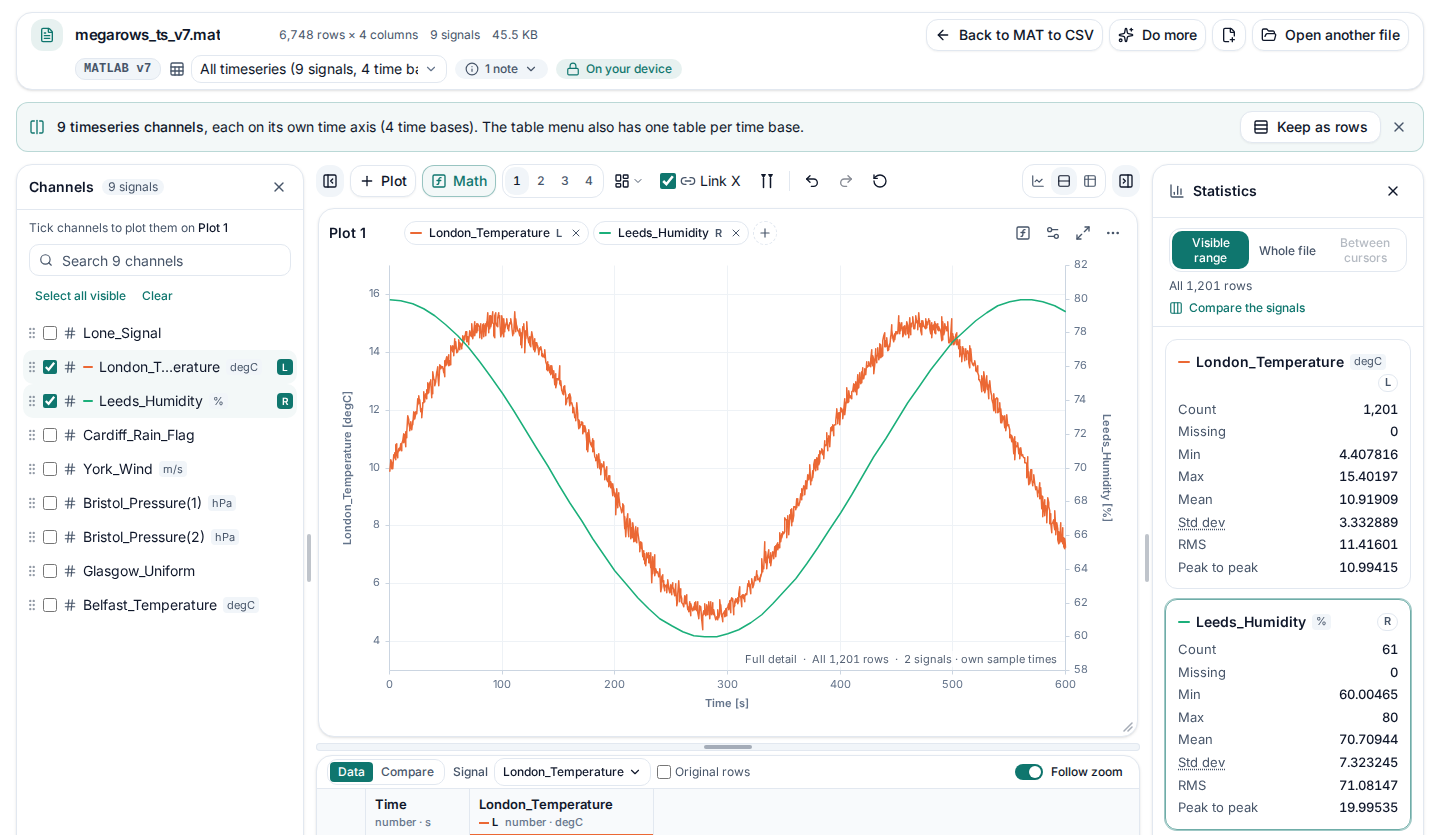
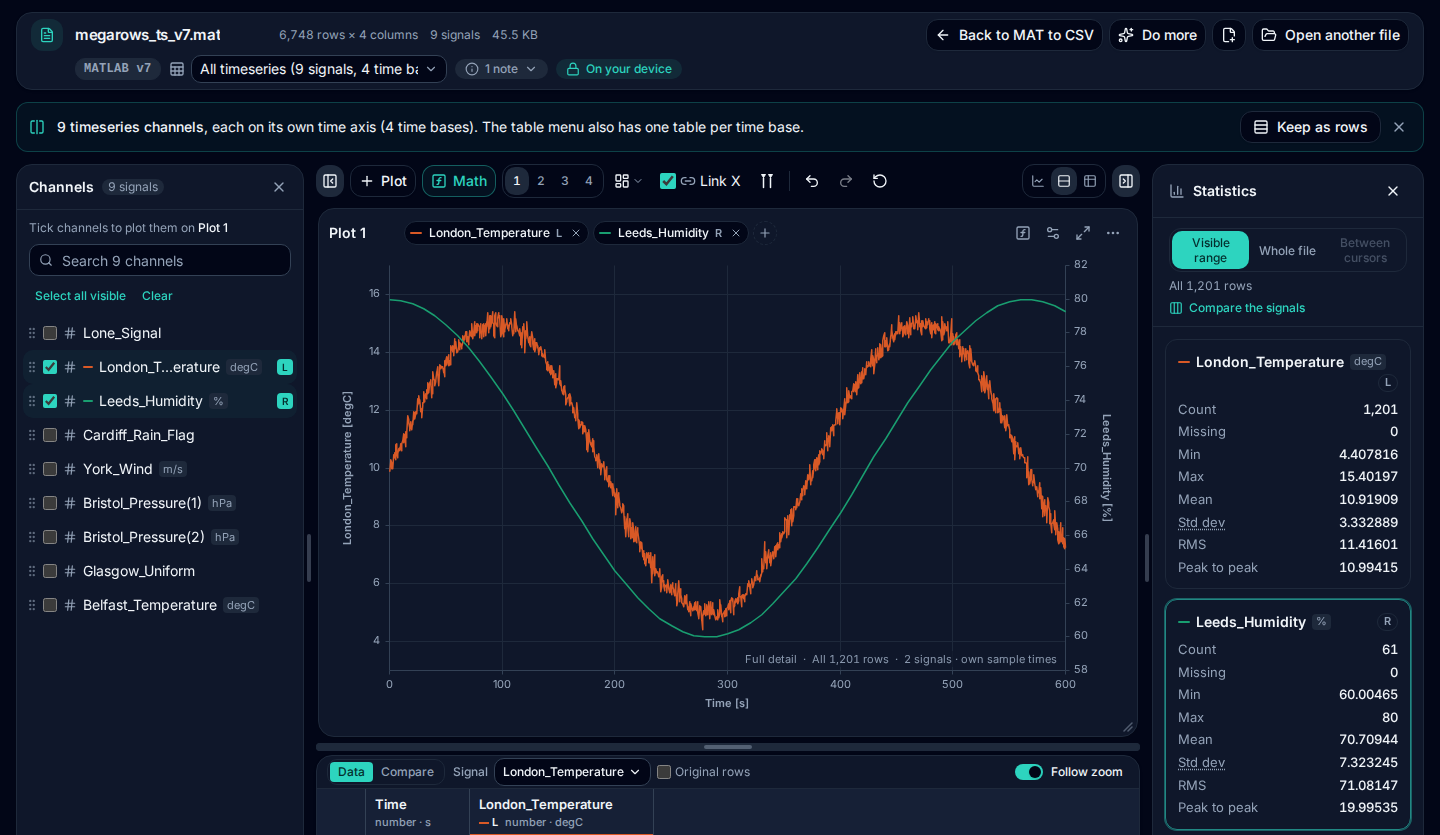
The first signal of the file is plotted against its time as soon as the file opens. Add more from Variables or the channel list. Signals from different tables, such as a 0.1 s and a 1 s Simulink signal, or a timeseries and a struct field, go on one chart, each on its own time. Zoom with the scroll wheel, a pinch or a drag; put a signal on the right axis; read each signal’s statistics for the range you see.
Export to CSV, or turn a CSV into a .mat file
Convert MAT to CSV: tick the signals and download them, time first, with the same 15 significant digits as MATLAB’s own CSV export. The chart saves as a PNG image. Going the other way, convert a CSV file to a .mat file that MATLAB loads with load.
What opens: MATLAB classes and containers
Each row is checked against the files named in it, most of them saved by MATLAB itself, by a test that runs before every update of this site. What doesn’t open yet is listed in the file’s notes and in Variables, and the rest of the file opens.
| MATLAB data | Opens | What you get | Tested with |
|---|---|---|---|
| Versions | |||
| MAT-file v4 | Yes | save -v4: numeric and text matrices. | megarows_pack2_v4.mat, saved by MATLAB;v4_le.mat, written in MATLAB’s format by our test tools |
| MAT-file v6 | Yes | save -v6: uncompressed. | megarows_pack2_v6.mat, saved by MATLAB |
| MAT-file v7 | Yes | MATLAB’s default when you call save: compressed. | megarows_pack2_sim_out_v7.mat, saved by MATLAB;megarows_ts_v7.mat, saved by MATLAB |
| MAT-file v7.3 | Yes | save -v7.3, needed for variables of 2 GB or more; files of several GB open. | megarows_pack2_v73_nocomp.mat, saved by MATLAB;megarows_pack2_sim_out_v73.mat, saved by MATLAB |
| Files written by Python | Yes | scipy.io.savemat (v4 to v7) and hdf5storage (v7.3). | scipy_v5.mat, written by SciPy;hdf5storage_v73.mat, written by hdf5storage |
| Numbers and text | |||
| double and single | Yes | Plotted as they are; a single keeps its own precision in exports. | types_v7.mat, written in MATLAB’s format by our test tools;scipy_v5.mat, written by SciPy |
| Integers (int8 to uint64) | Yes | Every integer class, signed and unsigned. | types_v7.mat, written in MATLAB’s format by our test tools;scipy_v5.mat, written by SciPy |
| Complex numbers | Yes | A real and an imaginary column, re and im. | types_v7.mat, written in MATLAB’s format by our test tools;layout_g_types.mat, written in MATLAB’s format by our test tools |
| Sparse matrices | Yes | Expanded up to a million elements; bigger ones are listed with their size. | types_v7.mat, written in MATLAB’s format by our test tools;scipy_v5.mat, written by SciPy |
| Files of single values only | Yes | A table of their names and values, one row each. | cells_scalars_v7.mat, written by SciPy;cells_scalars_v73.mat, written in MATLAB’s format by our test tools |
| Settings and parameter files | Yes | They open in Variables: every struct and field with its value, ready to copy; a few numbers among them can still be plotted. | settings_v7.mat, written in MATLAB’s format by our test tools;settings_v73.mat, written in MATLAB’s format by our test tools;station_settings_v7.mat, written in MATLAB’s format by our test tools |
| logical | Yes | Plotted as 0 and 1. | megarows_pack2_sim_structwithtime_v7.mat, saved by MATLAB;types_v7.mat, written in MATLAB’s format by our test tools |
| char | Yes | Text in the table; lists of names and units name the channels. | megarows_pack2_v6.mat, saved by MATLAB;megarows_pack2_v4.mat, saved by MATLAB |
| string | Yes | Text in the table; missing strings stay empty. | megarows_objects_v7.mat, saved by MATLAB;megarows_pack2_tables_v7.mat, saved by MATLAB |
| Structs and cells | |||
| Cell arrays | Yes | Every cell is in Variables, named as MATLAB indexes it, such as runs{2} or grid{2,1}; a cell of text of a signal’s length is a column. | megarows_pack2_v6.mat, saved by MATLAB;megarows_pack2_tables_v7.mat, saved by MATLAB |
| Numbers inside cell arrays | Yes | Vectors are signals, runs{1}, runs{2}, a table per length; a cell of single numbers (num2cell) is a column; a readcell sheet is a table named by its first row; structs and tables in cells open as elsewhere. | megarows_pack2_v6.mat, saved by MATLAB;cells_v7.mat, written by SciPy;cells_v73.mat, written in MATLAB’s format by our test tools |
| Structs, nested ones too | Yes | Every field by its path, such as Runs.Tuesday.Data. | megarows_pack2_tables_v7.mat, saved by MATLAB;layout_c_struct.mat, written in MATLAB’s format by our test tools |
| Struct arrays | Yes | Every element, s(1), s(2) and on; an array of signals is a table. | layout_f_signals.mat, written in MATLAB’s format by our test tools;v73_layout_f_signals.mat, written in MATLAB’s format by our test tools |
| Tables, times and timeseries | |||
| table | Yes | Its variables are columns with their units; row names are the first column. | megarows_pack2_tables_v7.mat, saved by MATLAB;megarows_objects_v7.mat, saved by MATLAB |
| timetable | Yes | Its row times are the x axis, also with a sample rate or a time step. | megarows_timetable_v7.mat, saved by MATLAB;megarows_pack2_tables_v7.mat, saved by MATLAB |
| datetime | Yes | Shown in the time zone saved with it, and a time axis to plot against. | megarows_objects_v7.mat, saved by MATLAB;megarows_pack2_tables_v7.mat, saved by MATLAB |
| duration | Yes | Shown as MATLAB writes it; plotted in seconds. | megarows_objects_v7.mat, saved by MATLAB;megarows_timetable_v7.mat, saved by MATLAB |
| categorical | Yes | Categories in the table, also ordinal ones. | megarows_objects_v7.mat, saved by MATLAB;megarows_pack2_unread_v7.mat, saved by MATLAB |
| timeseries | Yes | A channel with its name and unit, on its own time. | megarows_ts_v7.mat, saved by MATLAB;megarows_ts_v73.mat, saved by MATLAB |
| tscollection | Yes | Its members are channels on the collection’s time. | megarows_pack2_unread_v7.mat, saved by MATLAB;megarows_pack2_unread_v73.mat, saved by MATLAB |
| Simulink | |||
| Simulink Dataset (logsout, yout, xout) | Yes | Every logged signal; a bus is one channel per element. | megarows_dataset_v7.mat, saved by MATLAB;megarows_pack2_sim_parts_v73.mat, saved by MATLAB |
| SimulationOutput (out from sim) | Yes | Saved as it is: logsout, yout, xout, tout and the To Workspace variables. | megarows_pack2_sim_out_v7.mat, saved by MATLAB;megarows_pack2_sim_out_v73.mat, saved by MATLAB |
| Simulation Data Inspector exports | Yes | Every run, with its signals in tables of their own. | megarows_pack2_sdi_runs.mat, saved by MATLAB |
| To Workspace blocks | Yes | Structure with time, Structure, Array and Timeseries formats. | megarows_pack2_sim_structwithtime_v7.mat, saved by MATLAB;layout_d_simulink.mat, written in MATLAB’s format by our test tools |
| Not yet | |||
| calendarDuration | Not yet | Listed with a tip: split(c, {'months', 'days', 'time'}) in MATLAB gives numbers. | megarows_pack2_unread_v7.mat, saved by MATLAB |
| dictionary | Not yet | Listed with a tip: keys(d) and values(d) in MATLAB give its contents. | megarows_pack2_unread_v7.mat, saved by MATLAB |
| containers.Map | Not yet | Listed with a tip: keys(m) and values(m) in MATLAB give its contents. | megarows_pack2_unread_v7.mat, saved by MATLAB |
| Objects of your own classes | Not yet | Listed with a tip: struct(obj) in MATLAB gives their properties. | megarows_pack2_unread_v7.mat, saved by MATLAB |
| Function handles | Not yet | Listed: they hold code, not data. | megarows_pack2_unread_v7.mat, saved by MATLAB |
| Logged signals with a matrix, complex, enumerated or fixed-point value at each step | Not yet | Listed in the notes instead of being plotted (in v7.3 files and Simulation Data Inspector exports). | |
Where your .mat files come from
The viewer finds the signals in the file for you, in any of these layouts:
MATLAB save
Workspaces saved with save or from the Workspace browser: vectors, matrices, structs (also nested) and struct arrays of signals. A time vector such as t, time or tout becomes the x axis of the signals of the same length.
Simulink To Workspace formats and logged outputs
Structure with time, Structure and Array formats, plus tout and yout. Each block’s signals become one table with their labels as column names, multi-element signals included.
Simulink simulation output and Simulation Data Inspector exports
The output of sim saved as it is, for example save('run.mat', 'out'), in v7 or v7.3: the logged signals (logsout), the outputs (yout, named after their Outport blocks), the states (xout), tout and every To Workspace variable open as the same tables you get when you save them on their own, under their own names. A bus becomes one channel per element. Exports from the Simulation Data Inspector open with every run’s signals, each run in tables of its own.
Simulink To Workspace Timeseries format and structs of timeseries
MATLAB timeseries objects on their own, in structs (nested ones too), in a tscollection or in a logged Simulink Dataset, from v7 and v7.3 files alike. Every timeseries becomes a channel with its name and unit, multi-column ones as name(1), name(2). Signals that share a time vector are offered as one table, and signals logged at different rates are plotted together, each on its own time axis.
MATLAB tables and timetables
Numbers, text, categories, dates and durations become columns with their units. A timetable’s row times are the x axis, also when it was made with a sample rate or a time step.
MATLAB datetime, duration, string and categorical variables
On their own, in structs, in tables and timetables: dates and times show in the time zone saved with them, as in MATLAB, and become a time axis you can plot against; durations show as MATLAB writes them and plot in seconds; strings and categories show as text in the table. Missing dates, strings and categories stay empty.
Cell arrays: runs, num2cell and readcell
Vectors kept in a cell array, such as runs = {run1, run2, run3}, become signals named runs{1}, runs{2} and so on: those of one length share a table, other lengths get tables of their own, and a matrix in a cell is split into its columns. Structs, tables and timetables in cells open as they do anywhere else. A cell of single numbers, as num2cell gives it, is one column, with an empty cell as a missing value; a cell from readcell with a header row is a table named by that row, and a column called Time is its x axis. A file that holds only single values opens as a table of their names and values.
dSPACE-style measurement files
Files laid out like dSPACE measurement exports, with X and Y channels. Every raster (for example a 1 ms and a 10 ms task) becomes its own table with its own time axis, and channel names and units are kept.
Data-logger exports with a time matrix and a value matrix
Files that keep a recording as P_Time next to P_Value (or P_Data), one column per channel, as many data-acquisition and Java programs write them: the channels are plotted against their time in one table, which opens first. When every channel has its own time column, each keeps its own time axis.
CANape- and INCA-style exports
Files where every channel is a vector, with one or more time vectors such as t_eng or time_brake. Signals are paired with the matching time vector by name, and matrices with a list of channel names get those names as column headers.
Python
Files written by scipy.io.savemat (v4, v6, v7) and hdf5storage (v7.3) open the same way as files from MATLAB.
What isn’t supported yet
- containers.Map, dictionary and your own classes. These objects (and calendarDuration values) can only be read by MATLAB itself today. The viewer counts them in the notes, names them when you ask, and opens everything else in the file.
- Arrays of tables, and Dataset elements that are not timeseries. A table or timetable array, a Simulink Dataset element that holds something other than timeseries, or a signal that logs a matrix at every step in a v7.3 file or a Simulation Data Inspector export, is listed in the notes instead of being plotted.
- Function handles. Skipped, with a note.
- Very large sparse matrices. Sparse matrices with more than a million elements are listed in the notes instead of being expanded.
- Editing and saving. The viewer reads .mat files; it never changes them.
Tip: to open a containers.Map or an object of your own class here, convert it before saving: k = keys(m); v = values(m) gives a map’s contents, s = struct(obj) an object’s properties.
Built for big files
Long test runs and high-rate loggers easily produce .mat files of hundreds of megabytes. The viewer opens them in seconds, right in your browser. In our tests in Chrome on a recent laptop, a file with a time vector and four channels of 10 million samples each opened in:
- about 1 second saved with
-v6(400 MB); - about 2 seconds saved with
-v7(330 MB, compressed); - under 3 seconds saved with
-v7.3(330 MB).
A one-sample spike in 10 million samples is still visible in the overview, and zooming in reloads the exact values of the visible range instantly. Slower machines take longer, and very large files need enough free memory.
Private by design: nothing is uploaded
Measurement data is often confidential: unreleased prototypes, customer projects, supplier test results. MegaRows reads your .mat file in your browser, on your own device: the file and its name are never sent anywhere, and you can check that in the Network tab of your browser’s developer tools while it opens. Read the privacy statement for details.
Need to plot CSV, Excel or text logs as well? The same viewer opens them: see the CSV plotter.
Compare online MAT file viewers: what each one documents
As of , this is what the online MAT file viewers and converters we found say about themselves on their own pages, linked in the last row. We read those pages; we did not test the other tools with files. “Not stated” means we could not find it on the linked pages, not that the tool can’t do it. The MegaRows column is what our own tests check, file by file, in the compatibility table above.
| Capability | MegaRowsThis viewer | uDocumentViewerOnline viewer | FileProInfoOnline viewer | Viewer.onlineOnline viewer | Convert.GuruOnline converter | VertopalOnline converter |
|---|---|---|---|---|---|---|
| MAT-file v4 | YesTested with these files:megarows_pack2_v4.mat | No“Older v4 files … aren’t supported” | Not stated | Not stated | Not stated | Not stated |
| MAT-file v6 and v7 | YesTested with these files:megarows_pack2_v6.matmegarows_pack2_sim_out_v7.mat | Yes“any save -v6/-v7” | Not stated | Not stated | Not stated | Not stated |
| MAT-file v7.3 | YesTested with these files:megarows_pack2_v73_nocomp.mat | Yes“The ‘v7.3’ layout” | Not stated | Not stated | Not stated | Not stated |
| Structs | Yes, nested ones and struct arrays tooTested with these files:megarows_pack2_tables_v7.matlayout_f_signals.mat | Yes“Scalar structs render as a field-name / type table” | Not stated | Not stated | Not stated | Not stated |
| Cell arrays | Yes, every cellTested with these files:megarows_pack2_v6.mat | Yes“Cell arrays show their first 20 elements” | Not stated | Not stated | Not stated | Not stated |
| Tables and timetables | YesTested with these files:megarows_pack2_tables_v7.matmegarows_timetable_v7.mat | Not stated | Not stated | Not stated | Not stated | Not stated |
| Timeseries and Simulink logs (logsout, SimulationOutput) | YesTested with these files:megarows_ts_v7.matmegarows_dataset_v7.matmegarows_pack2_sim_out_v7.mat | Not stated | Not stated | Not stated | Not stated | Not stated |
| Runs on your device (no upload) | YesSee Private by design | Yes“Nothing leaves your machine” | No“on our own dedicated cloud servers” | No“Uploaded files are automatically deleted from our servers shortly after processing” | Yes“convert it securely right in your browser” | No“Drop Files Anywhere to Upload” |
| Plot the signals | Yes: line, step and scatter charts and histogramsSee Plot any signal | Not stated | Not stated | Not stated | Not stated | Not stated |
| Export to CSV | YesSee MAT to CSV | Not stated | Not stated | Not stated | Yes“For MATLAB data, convert 2D structures to CSV” | Lists image formats (PNG, JPG, TIFF and more), not CSV |
| Largest file | Files of several GB, as your device’s memory allowsSee Built for big files | Not stated | 150 MB“150 MB maximum file size” | 50 MB per file on its Starter plan“Up to 50 MB per file” | Not stated | 50 MB as a guest, 80 MB on its Free plan, 100 MB on Premium |
| Source, checked | Our compatibility table, tested before every update | its MAT viewer page, home page | its MAT viewer page | its MAT viewer page, home page, pricing | its MAT converter page | its MAT converter page, pricing |
MegaRows opens what the compatibility table lists, with the exceptions under What isn’t supported yet. Not in this table: programs where you write code, such as MATLAB Online, which is MATLAB itself with a MathWorks account, and Octave Online (see other ways to open a .mat file), and tools made for one kind of measurement file.
Other ways to open a .mat file
Python, GNU Octave, MATLAB Online and a free VS Code extension from MathWorks can open .mat files too, each with its own limits. Our guide How to open a .mat file without MATLAB compares them with this viewer, with tested Python code, a quick way to tell which version a file is, and how to convert a .mat file to CSV.
Frequently asked questions
Can I open a .mat file online without MATLAB?
Yes. Open this page, drop the .mat file on the viewer and tick the signals to plot: MATLAB v4 to v7.3 files open in your browser with no MATLAB licence or account, and nothing is uploaded. “Variables” lists everything in the file, structs and cells included, with its class and size.
Can I read a .mat file online without uploading it?
Yes. Open it in the viewer at the top of this page: your browser reads the file on your own device and never sends it to a server, so there is no upload, no waiting and no upload size limit. It works for MAT-file versions 4 to 7.3, including files of several GB, and you can plot any signal and save the data as a CSV file.
How do I open a .mat file without MATLAB?
Drop the file onto the viewer at the top of this page, or click “Choose a file”. Your browser reads it on your own device and shows the signals as a chart and a table within seconds, and “Variables” shows every variable, struct field and cell as MATLAB would, with its class, size and first values. You do not need MATLAB, a licence or any software to install.
Which MAT-file versions can I open?
All the common ones: MATLAB v4, v6, v7 (the default when you call save) and v7.3, including v7.3 files of several GB. Simulink- and dSPACE-style logs and files written by Python (scipy.io.savemat or hdf5storage) work too.
Can I view Simulink To Workspace output?
Yes. Structure with time, Structure, Array and Timeseries formats are recognised, as are tout, yout, xout and a logged Dataset, also when you save the whole simulation output as it is (save('run.mat', 'out')), in v7 or v7.3, and in Simulation Data Inspector exports, run by run. Each To Workspace block in a Structure format becomes a table with its signal labels as column names. Timeseries become channels with their names and units, each plotted against its own time, so signals logged at different rates can share one chart. “Variables” shows out with logsout, yout and the rest inside it, the way MATLAB does.
How can I read Simulink logsout without MATLAB?
Drop the .mat file on the MegaRows MAT file viewer at the top of this page: logsout opens whether you saved it on its own or inside the simulation output (out), in v7 or v7.3. Its signals keep their names, a bus gives one channel per element, and signals logged at different rates plot together. Nothing is uploaded.
Does it open dSPACE-style .mat measurement files?
Yes. Files laid out like dSPACE measurement exports, with X and Y channels, are recognised. Each measurement raster, for example a 1 ms and a 10 ms task, becomes its own table with the right time axis, and the channel names and units in the file are kept. Pick a raster from the menu in the top bar.
Does it read datetime, string and categorical variables?
Yes. Dates and times, durations, string arrays and categorical arrays open as columns, on their own, in structs, in cells and in tables and timetables, and a timetable’s dates become the x axis. Times show in the time zone saved with them, as in MATLAB, and durations as MATLAB writes them. Missing values stay empty. What the viewer can’t read yet (containers.Map, dictionary, calendarDuration and your own classes) is counted in the notes and greyed out in Variables with what to do instead, and the rest of the file opens.
How big can the .mat file be?
Files of several GB open, limited by your device’s memory. In our tests in Chrome on a recent laptop, a file with four channels of 10 million samples each opened in about 1 second saved with -v6, about 2 seconds with -v7 and under 3 seconds with -v7.3. Zooming in reloads the full detail instantly.
Can I view parameters and nested structs in a MAT file without MATLAB?
Yes. Open your file and choose Variables to browse saved variables, nested struct fields, and struct-array elements, even when there is nothing to plot. Inspect values and use Copy path or Copy value. Your file stays in your browser.
Is my .mat file uploaded anywhere?
No. The file is read by your browser on your own device, and neither the file nor its name is sent anywhere. That makes the viewer safe for test-bench data and unreleased engineering results. You can check it in the Network tab of your browser’s developer tools.
My file has several groups of signals. Which one is shown?
The viewer finds your signals automatically and groups the ones that share a time base into tables. The first table opens straight away, and the menu in the top bar lists every table with its name, so you can switch between Simulink blocks, measurement rasters or matrices without opening the file again. Or open “Variables” and tick signals from any of them: they are plotted together, each on its own time.
Related tools and guides
- CSV plotterOpen a CSV, Excel, TXT, JSON, MATLAB, Parquet, HDF5 or LabVIEW TDMS file with millions of rows and plot it in several linked charts, with zoom and statistics. Works today.
- Large CSV viewerOpen a CSV with millions of rows in your browser: scroll every row, see each column’s type and statistics, chart any column. Works today.
- Parquet viewerOpen large .parquet files, see the schema at once and plot millions of rows, without Python. Works today.
- TDMS viewerOpen .tdms files from LabVIEW, DIAdem and DAQmx loggers: every group, channel and property, each channel plotted against its time. Works today.
- HDF5 viewerOpen .h5, .hdf5 and NetCDF-4 .nc files: every group, dataset and attribute, each group’s datasets plotted against their time. Works today.
- MAT to CSVConvert the signals of a .mat file, v4 to v7.3, to a CSV for Excel or Python, without MATLAB. Works today.
- Parquet to CSVConvert a .parquet file to CSV in your browser, with the columns you pick. Works today.
- TDMS to CSVConvert the channels of a .tdms file to CSV, a group at a time, with its time column, without LabVIEW or Excel add-ins. Works today.
- HDF5 to CSVConvert the datasets of an .h5 or NetCDF-4 file to CSV, a table at a time, with its time column, without Python. Works today.
- Excel to CSVConvert any sheet of an .xlsx or .xlsm workbook to CSV, with the saved results of formulas, real dates and 15 significant digits. Works today.
- JSON to CSVConvert JSON and JSON Lines files to CSV: nested fields become columns named by their path, arrays stay as JSON text. Works today.
- CSV to MATConvert a CSV, Excel, JSON or Parquet file to a MATLAB .mat file: a field per column, with names and units, every row. Works today.
- Merge CSV filesAppend many CSV files into one, even with different columns or separators. Works today.
- Split CSV filesSplit a CSV too big for Excel into parts of 1,000,000 rows, parts of a size you choose, or one file per value of a column. Works today.
- CSV row counterCount the lines in a CSV, TSV or TXT file of any size. Works today.
- CSV statisticsCount, missing values, min, max, mean, standard deviation, RMS and peak to peak of each number column, for the whole file or the rows you zoom into. Works today.
- CSV histogramA histogram of any number column, with automatic bins or 10 to 200 of them, and each bin’s count as a table. Works today.
- CSV too large for Excel?Open every row of a CSV beyond Excel’s 1,048,576-row limit, or work around the limit in six other ways.
- FFT and PSD from a CSVTurn a signal column into an FFT spectrum or a PSD with Grms, with results checked against SciPy. Works today.
- PSD calculatorTurn a vibration column into a power spectral density (Welch) in g²/Hz, with the Grms of any band and a dB view. Works today.
- Spectrogram from CSVSee how the frequencies of a measured signal change over time, as a heat map in dB, with the window and range you choose. Works today.
- FRF and coherencePick an input and an output column and get the frequency response (H1, H2, magnitude and phase) and their coherence. Works today.
- The MegaRows toolboxWhat works today and what is coming next, and why nothing is ever uploaded.
Coming soon to MegaRows: CSV to Excel and PDF reports · Compare CSV versions.
MegaRows processes files locally in your browser. Nothing is uploaded, not even the file name.