Large CSV file viewer: open huge CSV files online, free
Every row of a huge CSV, in your browser. Free, and nothing is uploaded.
Open a large CSV as a table
Drop it here or choose a file. Browse every row, sort and filter, inspect each column, then chart what you need.
The sample is 1,000,000 hourly readings of made-up UK weather.
Tip: drop several files to compare them.
Your file never leaves your device. It is read and charted by your browser. Nothing is uploaded.
- Available now:
- scroll every row, sort, filter and search the rows, each column’s type and unit, statistics for any column, charts, a search of the column names, and the table as shown (sorted and filtered, every column), the whole file, or the plotted columns for the rows in view as a CSV.
- Coming soon:
- comparing two versions of a CSV by key.
Speed test: a 423 MB CSV of 10,000,000 rows × 5 columns, from choosing the file to its first chart in 2.74 s, the median of 5 cold opens (2.64 to 3.05 s) in Chromium on a MacBook Air (Apple M4), 8 October 2026. Slower devices take longer. How we measure speed
At a glance
- Opens
- CSV, TSV, TXT and DAT files with comma, semicolon, tab, pipe or space-aligned columns, also compressed (.csv.gz) or inside a ZIP archive, plus Excel .xlsx, JSON, MATLAB .mat, Parquet, HDF5 and TDMS files.
- Size
- No fixed row limit: the practical limit is your device. A 2-million-row CSV opens in about 1 second, and 10 million rows open and draw their first chart in about 3 seconds.Measured in Chrome on a recent laptop (Apple M4): a 423 MB CSV with 10,000,000 rows and 5 columns, from choosing the file to the first chart. Slower devices take longer.
- The table
- Every row, scrolled smoothly, with row numbers, each column’s type and unit in its header, and a click on a row to show it on the charts.
- Statistics
- Count, missing values, min, max, mean, median, quartiles and standard deviation for number columns; distinct and most frequent values for text columns.
- Charts
- Line, bar, area, scatter and histogram charts of any column, zoomable down to single rows, with the table following the zoom, and box plots of the columns side by side.
- Export
- The table as shown (sorted and filtered, every column), the whole file, or the plotted columns for the rows in view as a CSV file; any chart as a PNG image.
- Processing
- Runs in your browser. Your file is never uploaded, not even its name.
- Price
- Free. No account or sign-up.
How to view a large CSV file
- Open your CSV file. Drop the file onto the viewer at the top of this page, or click “Choose a file”. The separator, decimal commas, the text encoding and the header row are detected for you, so a semicolon-separated export from a European Excel opens just as well.
- Scroll through the rows. The data table opens first. Scroll through every row, however many there are; each column header shows the column’s type (number, date and time, duration, text or category) and its unit, where the file has one. The number of rows and columns is shown above the table.
- Sort and filter the rows. Point at a column header and click its arrows to sort by that column (Shift-click adds a second one). For more, right-click the header, or click the ▾ at its right: Sort ascending, Sort descending and “Filter…”, which keeps only the rows you need, such as temperatures above 30 or one city. On a phone or tablet, tap the header. The count above the table shows how many rows are left.
- Check the columns and chart them. Search the column list by name, and open the statistics panel for the count, missing values, minimum, maximum, mean and standard deviation of any column. Click a column header to plot it, and switch to “Split” in the toolbar to see the chart above the table.
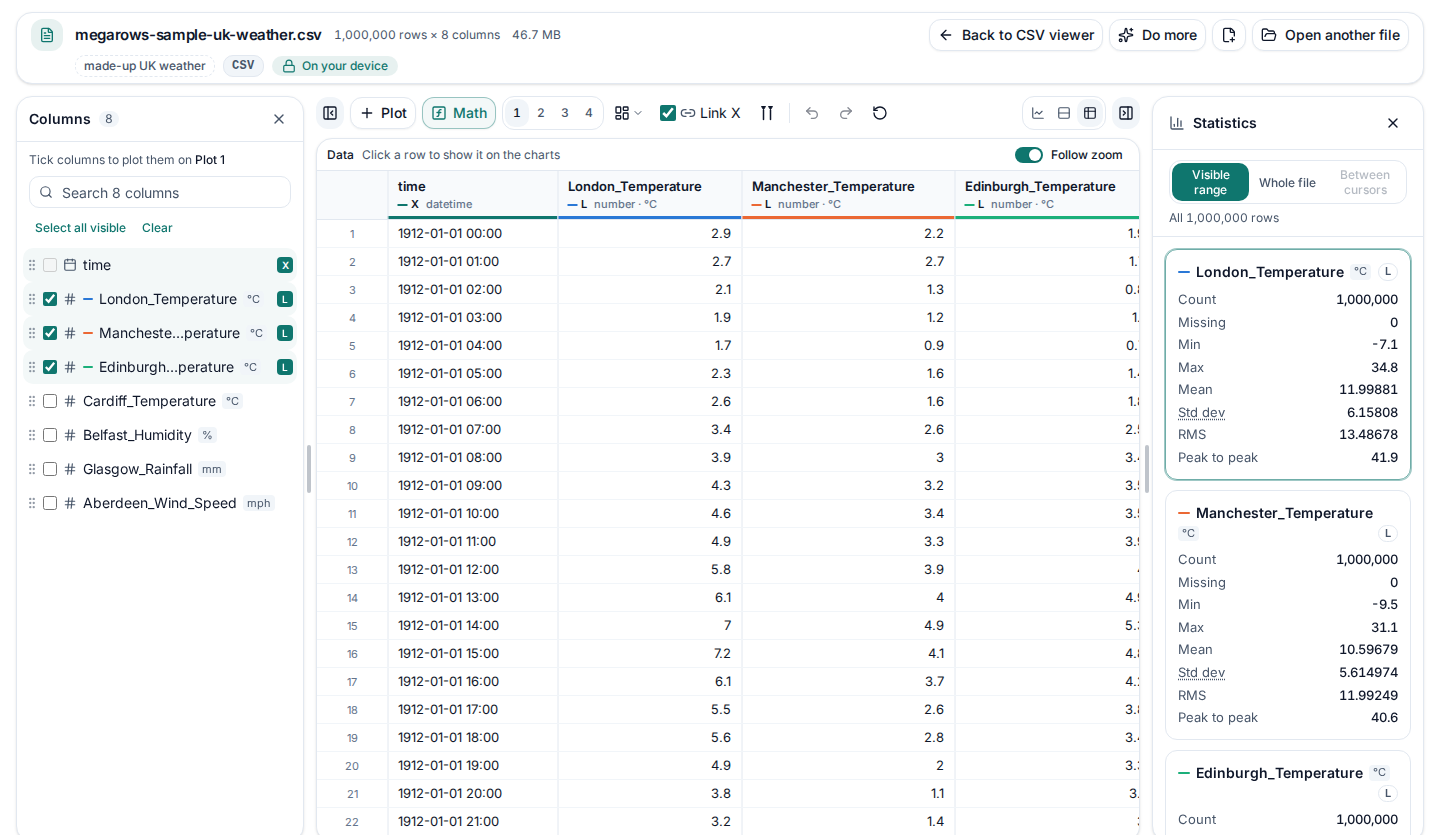
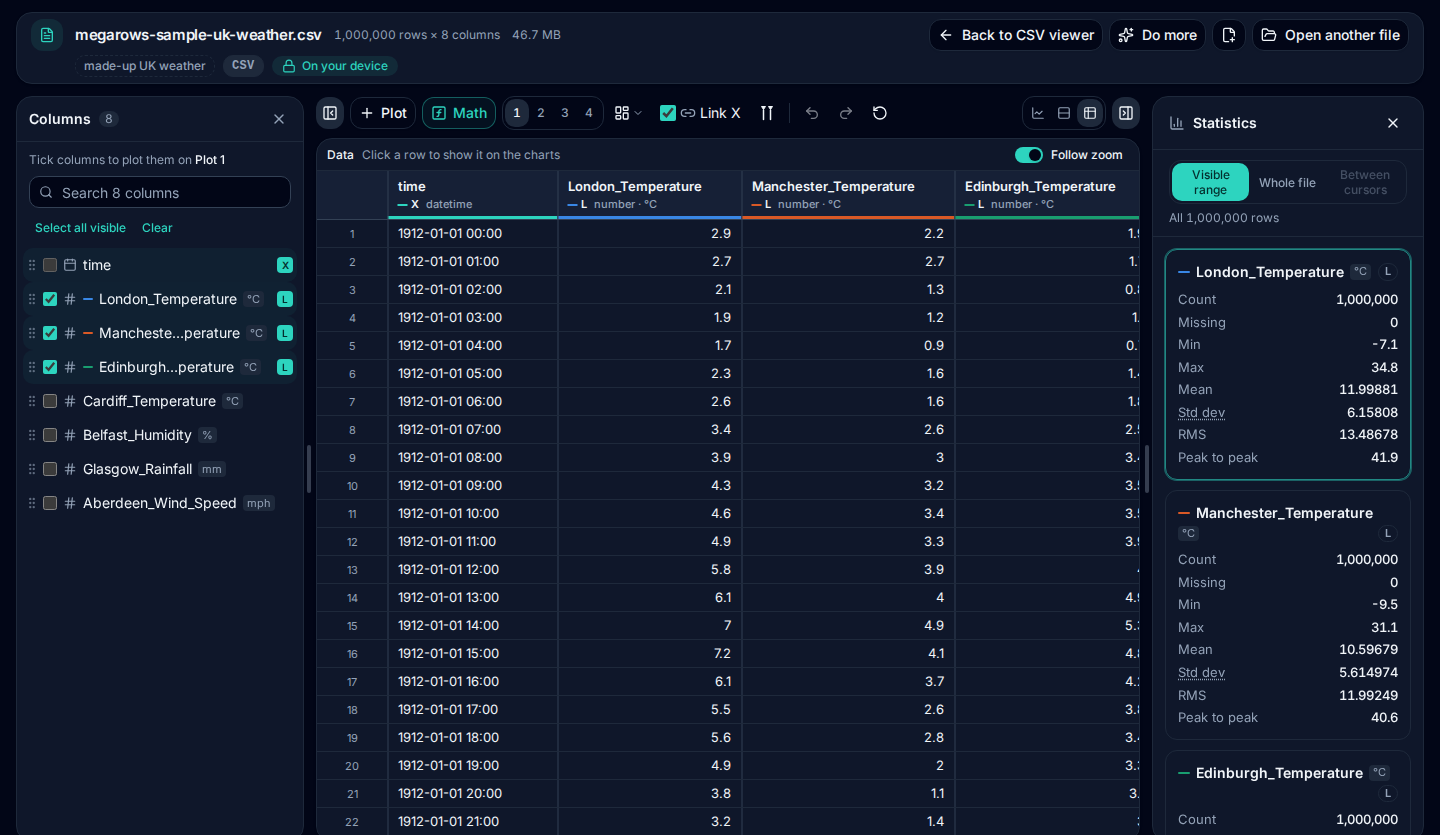
No file to hand? Click Try a 1-million-row CSV in the viewer: it opens 1,000,000 hourly readings of made-up UK weather, made on your device. Or download one of the large sample CSV files to try, up to 100,000 rows.
What you can do with it
Scroll millions of rows
The table shows every row of the file, not a preview of the first thousand. It only draws the rows on screen, so scrolling stays smooth at 10 million rows, and the scroll bar takes you anywhere in the file.
See what each column holds
Each column is recognised as numbers, dates and times, durations, text or categories. Units come from a units row under the header, or from the values themselves, such as % or £. Numbers are right-aligned, and a decimal comma is read as a decimal.
Statistics in a click
The statistics panel gives the count, missing values, minimum, maximum, mean, median, quartiles and standard deviation of a number column, or the distinct and most frequent values of a text column, calculated from every row.
Find a column fast
Exports with hundreds of columns are easy to find your way around: the column list has a search box, groups columns with a shared prefix and can be made wider.
Chart any column
Plot a column against time or another column, add more charts side by side and zoom into a moment. The table jumps to the first row in view, and hovering a chart highlights the row under the cursor. With stacked lanes you can compare CSV signals on a shared time axis, each with its own Y axis.
Several files at once
Choose or drop more than one file to open them together: each gets its own tab in the table, and their columns can be plotted and compared side by side.
How big a CSV can it open?
There is no fixed row limit and no file-size cap: the practical limit is your device’s memory. In our tests in Chrome on a recent laptop:
- a 143 MB CSV with 2,000,000 rows and 9 columns opened in about 1 second;
- a 423 MB CSV with 10,000,000 rows and 5 columns opened and drew its first chart in about 3 seconds;
- a 1.4 GB export with 28 million rows opened, with its 1,900 signals split into channels.
Measured in Chrome on a recent laptop (Apple M4): a 423 MB CSV with 10,000,000 rows and 5 columns, from choosing the file to the first chart. Slower devices take longer.
The table draws only the rows on screen, so scrolling stays smooth however long the file is. Phones and older computers have less memory: a file of several hundred megabytes is best opened on a laptop or desktop.
How we time these files, cold and warm, on which machine and browser, and where the limits are: how we measure speed.
Large CSV viewer vs the usual options
When a CSV is too big for a spreadsheet, these are the usual ways to open it, and how they compare.
| Option | Big files | Privacy | Columns and statistics |
|---|---|---|---|
| Excel | An Excel worksheet holds up to 1,048,576 rows: a bigger CSV is cut off, with a warning that is easy to miss. | Local. | Yes, but slow to open and scroll long before the limit. |
| Text editors | Some open files of a few GB, many slow down or refuse. | Local. | No: you see raw text, with no columns, types or statistics. |
| Online viewers that upload the file | Depends on the service: some cap the file size or the rows, and a big file has to upload before you see any of it. | A copy of your file goes to their server. | Depends on the service. |
| Other online viewers that work in your browser | Depends on the tool and your device: check the limits it states. | Local, as here. The Network tab of your browser’s developer tools shows whether a file is uploaded. | Depends on the tool. |
| MegaRows large CSV viewer | No fixed row limit: the practical limit is your device. Tested with 10 million rows and more. | Nothing is uploaded: the file is read in your browser. | Yes: types, units, statistics and charts for every column. |
Private by design: nothing is uploaded
This viewer never uploads your file: your browser reads it straight from your disk, and the file and its name never leave your device. Nothing has to travel over the network first, so a big file opens as fast as your computer can read it, and no copy of your data ends up on anyone else’s computer. You can check it in the Network tab of your browser’s developer tools while the file opens. Read the privacy statement for details.
More for big files
Only need the number of rows? The CSV row counter counts the lines of any file without opening it. To chart and analyse the data, the CSV plotter opens the same files with the charts first. Several exports to combine? Merge them into one CSV. Separate runs to compare? Our guide shows how to plot multiple CSV files on one graph. And our guide explains every way to open a CSV file that is too large for Excel.
Frequently asked questions
How do I open a large CSV file without Excel?
Drop it onto the viewer at the top of this page, or click “Choose a file”. Your browser reads the file on your own device and shows every row in a table, with each column’s type and statistics. There is nothing to install and no account to create.
Can I view a CSV file with more than 1,048,576 rows?
Yes. Excel stops at 1,048,576 rows, but this viewer has no fixed row limit. In our tests a 2-million-row CSV opened in about 1 second, and a 10-million-row CSV opened and drew its first chart in about 3 seconds (measured in Chrome on a recent laptop, with a 423 MB CSV of 10,000,000 rows and 5 columns). You can scroll to the very last row.
How big a CSV file can I open online for free?
There is no fixed limit on rows or file size: the practical limit is your device’s memory. We test with files of 143 MB (2 million rows), 423 MB (10 million rows) and a 1.4 GB export with 28 million rows. Slower or older devices take longer and may run out of memory sooner.
Is my CSV file uploaded anywhere?
No. The file is read by your browser on your own device, and neither the file nor its name is sent to a server. That keeps customer lists, financial exports and test data private. You can check it in the Network tab of your browser’s developer tools while the file opens.
Can I search, sort or filter the rows?
Yes, on millions of rows. Right-click a column header (tap it on a phone or tablet), or click the ▾ at its right, and choose Sort ascending, Sort descending or “Filter…” to keep only the rows you need, such as temperatures above 30 or one city. The arrows next to the ▾ sort with one click (Shift-click adds a second column). Press Ctrl+F (⌘F on a Mac) or the search button to find any value and step through the matches. The row count shows how many rows are left, and in a filtered table, zooming a chart still takes it to the first row in view.
What else can it open besides CSV?
TSV, TXT and DAT files with any common separator, Excel .xlsx and .xlsm workbooks (with a sheet picker), JSON and JSON Lines files, MATLAB .mat files, Parquet files, HDF5 or NetCDF-4 files and NI TDMS files. A CSV compressed with gzip (.csv.gz) opens without extracting it first, and so does a CSV inside a ZIP archive (with several files in it, tick up to 8 and each opens as a file of its own). Old .xls workbooks need to be saved as .xlsx in Excel first.
Why does my CSV look wrong in Excel but fine here?
Excel guesses separators and number formats from your computer’s regional settings, so a file with semicolons or decimal commas can land in one column, and long numbers or dates can be changed as it opens. The viewer detects the separator, decimal commas and date formats from the file itself and never changes the file.
Can I save part of a large CSV?
Yes. Sort and filter the table to the rows you need, or zoom a chart into a range. Under “Do more”, “Download the table as shown (CSV)” saves the table’s rows as you see them, sorted and filtered, with every column; “Download all columns (CSV)” saves every column and every row, the whole file; and “Download chart data (CSV)” saves the plotted columns for the rows in view. Your original file is never changed.
Related tools and guides
- CSV plotterOpen a CSV, Excel, TXT, JSON, MATLAB, Parquet, HDF5 or LabVIEW TDMS file with millions of rows and plot it in several linked charts, with zoom and statistics. Works today.
- MATLAB .mat file viewerOpen v4 to v7.3 .mat files without MATLAB and plot any signal. Works today.
- Parquet viewerOpen large .parquet files, see the schema at once and plot millions of rows, without Python. Works today.
- TDMS viewerOpen .tdms files from LabVIEW, DIAdem and DAQmx loggers: every group, channel and property, each channel plotted against its time. Works today.
- HDF5 viewerOpen .h5, .hdf5 and NetCDF-4 .nc files: every group, dataset and attribute, each group’s datasets plotted against their time. Works today.
- MAT to CSVConvert the signals of a .mat file, v4 to v7.3, to a CSV for Excel or Python, without MATLAB. Works today.
- Parquet to CSVConvert a .parquet file to CSV in your browser, with the columns you pick. Works today.
- TDMS to CSVConvert the channels of a .tdms file to CSV, a group at a time, with its time column, without LabVIEW or Excel add-ins. Works today.
- HDF5 to CSVConvert the datasets of an .h5 or NetCDF-4 file to CSV, a table at a time, with its time column, without Python. Works today.
- Excel to CSVConvert any sheet of an .xlsx or .xlsm workbook to CSV, with the saved results of formulas, real dates and 15 significant digits. Works today.
- JSON to CSVConvert JSON and JSON Lines files to CSV: nested fields become columns named by their path, arrays stay as JSON text. Works today.
- CSV to MATConvert a CSV, Excel, JSON or Parquet file to a MATLAB .mat file: a field per column, with names and units, every row. Works today.
- Merge CSV filesAppend many CSV files into one, even with different columns or separators. Works today.
- Split CSV filesSplit a CSV too big for Excel into parts of 1,000,000 rows, parts of a size you choose, or one file per value of a column. Works today.
- CSV row counterCount the lines in a CSV, TSV or TXT file of any size. Works today.
- CSV statisticsCount, missing values, min, max, mean, standard deviation, RMS and peak to peak of each number column, for the whole file or the rows you zoom into. Works today.
- CSV histogramA histogram of any number column, with automatic bins or 10 to 200 of them, and each bin’s count as a table. Works today.
- CSV too large for Excel?Open every row of a CSV beyond Excel’s 1,048,576-row limit, or work around the limit in six other ways.
- FFT and PSD from a CSVTurn a signal column into an FFT spectrum or a PSD with Grms, with results checked against SciPy. Works today.
- PSD calculatorTurn a vibration column into a power spectral density (Welch) in g²/Hz, with the Grms of any band and a dB view. Works today.
- Spectrogram from CSVSee how the frequencies of a measured signal change over time, as a heat map in dB, with the window and range you choose. Works today.
- FRF and coherencePick an input and an output column and get the frequency response (H1, H2, magnitude and phase) and their coherence. Works today.
- The MegaRows toolboxWhat works today and what is coming next, and why nothing is ever uploaded.
Coming soon to MegaRows: CSV to Excel and PDF reports · Compare CSV versions.
MegaRows processes files locally in your browser. Nothing is uploaded, not even the file name.