Convert CSV to a MATLAB .mat file
Open a CSV, download a .mat file for MATLAB. Free, and nothing is uploaded.
Convert a CSV file to MATLAB .mat
Drop a file here or choose one. CSV, TSV, TXT, Excel, JSON or Parquet, millions of rows: every row to a .mat file.
The sample is 1,000,000 hourly readings of made-up UK weather, made on your device.
Your file never leaves your device. It is read and converted by your browser. Nothing is uploaded.
At a glance
- Reads
- CSV, TSV, TXT and DAT files, Excel workbooks, JSON, Parquet and .mat files, with millions of rows.
- The .mat file
- MATLAB v7, compressed: a struct data with a field per column (or one variable per column, or a matrix of the number columns), plus the original column names and units.
- Values
- Every row, every number exactly as in the file (double, or single if you choose), text as cell arrays, true/false as logical, NaN where a number is missing.
- Dates and times
- MATLAB datenum (ready for datetime), POSIX seconds or text, in the file’s own time zone; durations in seconds.
- MATLAB needed?
- Not to convert: no licence, no toolbox, no install. Open the file with load in MATLAB or GNU Octave, or scipy.io.loadmat in Python.
- Processing
- Runs in your browser. Your file is never uploaded.
- Price
- Free. No account or sign-up.
How to convert a CSV file to MAT
- Open your file. Drop a CSV onto the converter at the top of this page, or click “Choose a file”. TSV, TXT, Excel, JSON and Parquet files work too. The separator, header row, units row and column types are found for you.
- Choose what goes in. Every column is ticked; untick the ones you do not need. Pick the layout (a struct with a field per column is the default), how dates and times are written, and whether numbers stay double. The size before compression is shown as you choose.
- Download the .mat file. Click “Download”. Every row is written to a MATLAB v7 file named after yours, and your browser saves it like any download. In MATLAB, load it and your columns are there; GNU Octave and Python read it too.
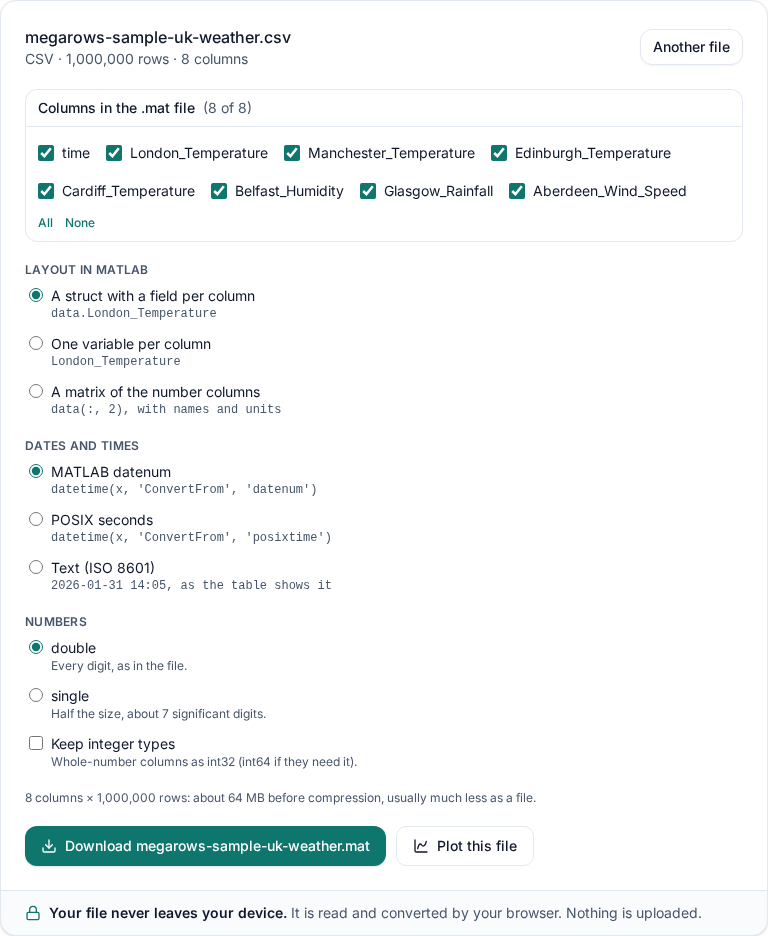
No CSV to hand? Try it with sample data: 1,000,000 hourly readings of made-up UK weather, made on your device.
A .mat data file, not .m code
Not every “CSV to MATLAB” tool gives you a .mat file. Some write a .m script: MATLAB code with your numbers typed out as an array, which you run to rebuild the data. That is fine for a small table but slow and unwieldy for a big one. And a converter labelled “CSV to MAT” may turn the table into an image rather than keep its columns. This converter writes a binary MAT-file, the format MATLAB’s own save writes: one load reads it, every number exactly as in your CSV, each column under its own name.
Which programs read it
- MATLAB: the file is a MAT-file version 7, which MathWorks lists as readable by MATLAB 7.0 (R14) and later. We opened the sample’s file in MATLAB R2026b and every value matched, line for line (9 Oct 2026).
- GNU Octave:
loadreads it. We check every layout in Octave, value by value. - Python:
scipy.io.loadmatreads it, with every value the same as in your file. We check every layout with it too.
If a file from here does not load as you expect, .
What you get in MATLAB
One load and your columns are there, each a column vector with every row. With the default layout they are fields of a struct called data:
load('weather.mat')                 % data, names, units, source_file, created_by, notes
data.London_Temperature             % one column, every row
t = datetime(data.time, 'ConvertFrom', 'datenum');
plot(t, data.London_Temperature)
T = struct2table(data);             % the same columns as a MATLAB table
names                               % the original column names
Next to data, the file holds names (your column names as they were, in order), units (when the file has a units row or the column names carry units), source_file, created_by and notes, which say how dates were written and how to turn them back into datetime.
Three layouts
- A struct with a field per column (the default):
data.London_Temperature. Every column keeps its type: numbers, text, true/false.struct2table(data)makes it a table. - One variable per column:
London_Temperaturestraight in your workspace, as if you had typed it. Each column can be up to 2 GB. - A matrix of the number columns:
data(:, 2), withnamesandunitsin the same order as the matrix columns. Text columns are left out and listed innotes.
Numbers are double by default, every digit exactly as in your file. Choose single for half the size, or keep integer types to save whole-number columns as int32 (int64 when they need it).
Dates and times
A date-time column is written as a MATLAB datenum by default: days from year 0, the number datetime(x, 'ConvertFrom', 'datenum') turns back into dates. Choose POSIX seconds (seconds since 1 January 1970 UTC) for 'ConvertFrom', 'posixtime', or text to get the dates as the table shows them. A file that names its time zone keeps its own clock, and notes says which zone. Durations become seconds.
Excel or Parquet to MAT
The same converter takes an Excel workbook (.xlsx, .xlsm: pick the sheet), a Parquet file, JSON or JSON Lines, and TXT or DAT logger exports. A .mat file opens too, so you can save part of it again. To go the other way, use MAT to CSV; to look inside a .mat file first, open it in the MAT file viewer.
Big files
There is no fixed row limit; the practical limit is your device. A .mat file (v7) holds at most 2 GB per variable before compression, about 268 million numbers. With the struct layout that is the whole struct, so for a very big file choose One variable per column: the converter tells you before writing anything if a variable would be too big. Bigger variables (v7.3 files) are coming.
The same in MATLAB
With MATLAB at hand and a file that fits in memory, readtable and save do it in three lines:
T = readtable("weather.csv");
data = table2struct(T, "ToScalar", true);
save("weather.mat", "data")
Prefer code? How to convert CSV to a .mat file in MATLAB, Python or Octave: tested code, and what to watch for with column names, text, dates and big files.
The converter here needs no MATLAB licence, reads files too big to open comfortably in a script, and works on any computer with a browser. See all tools for the other converters.
Private by design: nothing is uploaded
Your browser reads the file straight from your disk and writes the .mat file on your device: the file and its name never leave it, which you can check in the Network tab of your browser’s developer tools. Read the privacy statement for details.
Frequently asked questions
Which MAT-file version does it write?
Version 7, compressed: the format MATLAB’s save writes by default, which MathWorks lists as readable by MATLAB 7.0 (R14) and later. GNU Octave and Python’s scipy.io.loadmat read it too, and we check every layout with both, value by value. MATLAB R2026b opens them too: it read the sample’s file and every value matched, line for line (9 Oct 2026).
Is my file uploaded?
No. Your browser reads the file and writes the .mat file on your own device. Neither the file nor its name is sent anywhere, so it is safe for test data and unpublished results; you can check it in the Network tab of your browser’s developer tools.
How big can the file be?
There is no fixed row limit; the practical limit is your device’s memory. A .mat file (v7) holds at most 2 GB per variable before compression, which is about 268 million numbers. If the struct would be bigger, the converter says so: choose “One variable per column” and each column gets its own 2 GB. Bigger variables (v7.3 files) are coming.
What happens to text, true/false and missing values?
Text columns become cell arrays of text (cellstr), with an empty text where a value is missing. Columns of true and false become logical. A missing number is NaN, as MATLAB writes it. Nothing is rounded: numbers keep every digit of the file.
How are column names turned into MATLAB names?
MATLAB field and variable names start with a letter and hold only letters, digits and underscores. We also keep them within 63 characters, the limit before MATLAB R2025a, so older releases read them too. So “London Temperature” becomes London_Temperature, “Température (°C)” becomes Temperature_C, “2nd sensor” becomes x2nd_sensor and repeated names get _2, _3. The original names are saved in names, in the same order.
Can I convert an Excel or Parquet file to MAT?
Yes, with the same converter: open the .xlsx workbook (pick the sheet), the .parquet file or a JSON file instead of a CSV. A .mat file can be opened too and saved again, for example to keep only some of its signals.
Related tools and guides
- CSV plotterOpen a CSV, Excel, TXT, JSON, MATLAB, Parquet, HDF5 or LabVIEW TDMS file with millions of rows and plot it in several linked charts, with zoom and statistics. Works today.
- Large CSV viewerOpen a CSV with millions of rows in your browser: scroll every row, see each column’s type and statistics, chart any column. Works today.
- MATLAB .mat file viewerOpen v4 to v7.3 .mat files without MATLAB and plot any signal. Works today.
- Parquet viewerOpen large .parquet files, see the schema at once and plot millions of rows, without Python. Works today.
- TDMS viewerOpen .tdms files from LabVIEW, DIAdem and DAQmx loggers: every group, channel and property, each channel plotted against its time. Works today.
- HDF5 viewerOpen .h5, .hdf5 and NetCDF-4 .nc files: every group, dataset and attribute, each group’s datasets plotted against their time. Works today.
- MAT to CSVConvert the signals of a .mat file, v4 to v7.3, to a CSV for Excel or Python, without MATLAB. Works today.
- Parquet to CSVConvert a .parquet file to CSV in your browser, with the columns you pick. Works today.
- TDMS to CSVConvert the channels of a .tdms file to CSV, a group at a time, with its time column, without LabVIEW or Excel add-ins. Works today.
- HDF5 to CSVConvert the datasets of an .h5 or NetCDF-4 file to CSV, a table at a time, with its time column, without Python. Works today.
- Excel to CSVConvert any sheet of an .xlsx or .xlsm workbook to CSV, with the saved results of formulas, real dates and 15 significant digits. Works today.
- JSON to CSVConvert JSON and JSON Lines files to CSV: nested fields become columns named by their path, arrays stay as JSON text. Works today.
- Merge CSV filesAppend many CSV files into one, even with different columns or separators. Works today.
- Split CSV filesSplit a CSV too big for Excel into parts of 1,000,000 rows, parts of a size you choose, or one file per value of a column. Works today.
- CSV row counterCount the lines in a CSV, TSV or TXT file of any size. Works today.
- CSV statisticsCount, missing values, min, max, mean, standard deviation, RMS and peak to peak of each number column, for the whole file or the rows you zoom into. Works today.
- CSV histogramA histogram of any number column, with automatic bins or 10 to 200 of them, and each bin’s count as a table. Works today.
- CSV too large for Excel?Open every row of a CSV beyond Excel’s 1,048,576-row limit, or work around the limit in six other ways.
- FFT and PSD from a CSVTurn a signal column into an FFT spectrum or a PSD with Grms, with results checked against SciPy. Works today.
- PSD calculatorTurn a vibration column into a power spectral density (Welch) in g²/Hz, with the Grms of any band and a dB view. Works today.
- Spectrogram from CSVSee how the frequencies of a measured signal change over time, as a heat map in dB, with the window and range you choose. Works today.
- FRF and coherencePick an input and an output column and get the frequency response (H1, H2, magnitude and phase) and their coherence. Works today.
- The MegaRows toolboxWhat works today and what is coming next, and why nothing is ever uploaded.
Coming soon to MegaRows: CSV to Excel and PDF reports · Compare CSV versions.
MegaRows processes files locally in your browser. Nothing is uploaded, not even the file name.